On this page · 12 sections
A website that gets visitors but no enquiries is one of the most frustrating problems in small business marketing. You can see people arriving in your analytics. The phone isn't ringing. And every agency you speak to has a different theory, usually one that happens to match what they sell. This guide gives you a way to find the real cause yourself, by checking the six places leads leak out of a website in the order that matters, with the reports and tests that show you where your own site is failing.
Why the order of checks matters
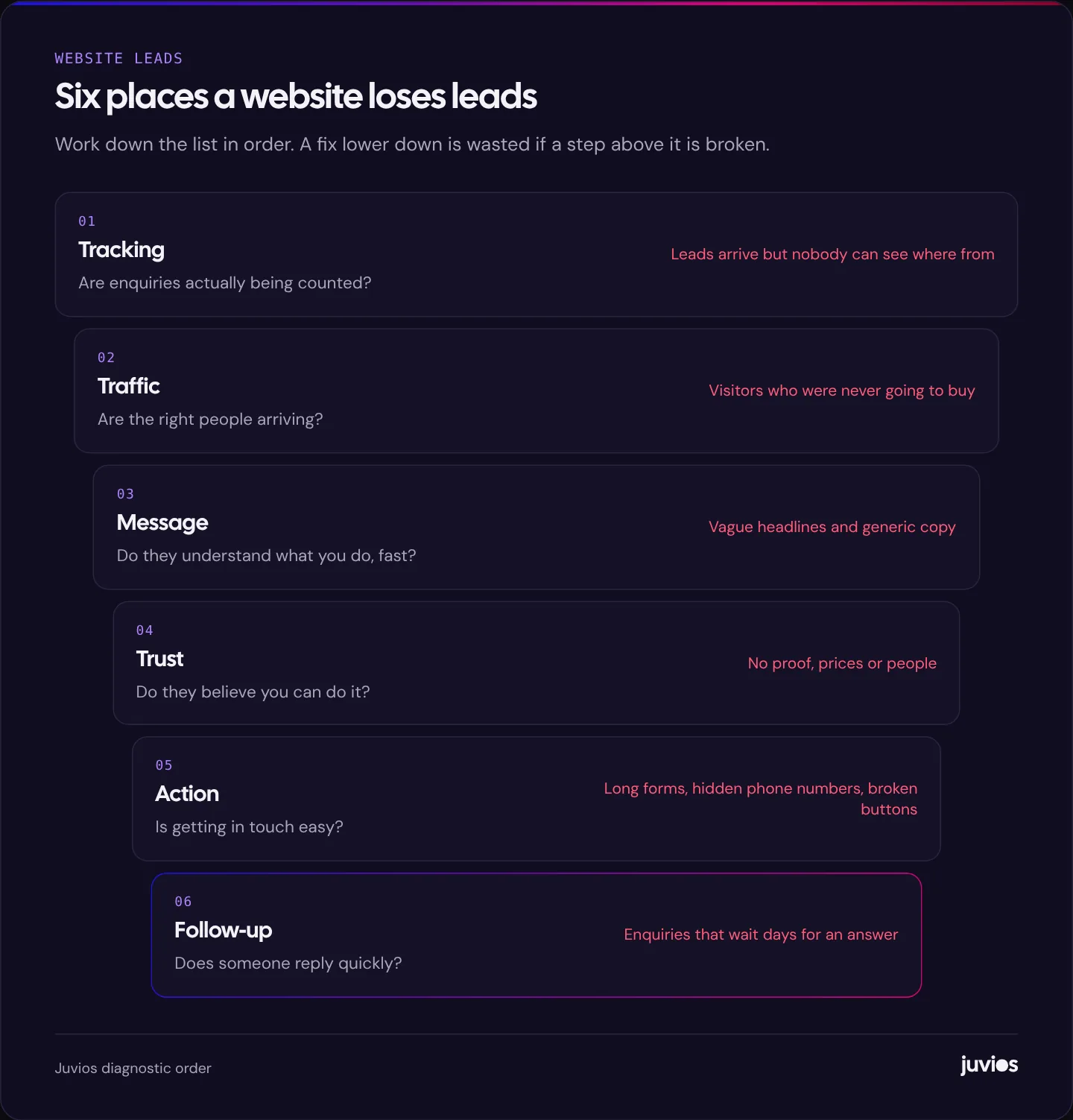
When a website isn't producing leads, the temptation is to jump straight to the most visible fix: a new design, a new headline, more ads. But a website is a chain. Someone has to find it, be the right kind of person, understand what you offer, trust you, take action, and then get a reply. If any link is broken, improving the others does very little.
So we check from the top. There's no point rewriting your headline if your enquiry form has been quietly failing for three months, and there's no point redesigning the contact page if the people arriving were never going to buy. Work through the steps below in order, and stop at the first one that's clearly broken. That's where your effort will pay back fastest.
 Tap to enlarge
Step 1: Check that leads are actually being counted
It sounds obvious, but the first question is whether the website is really producing no leads, or whether nobody can see them. We regularly find sites where the form sends enquiries to an inbox no one checks, where the phone number is out of date, or where the analytics stopped recording form submissions after a redesign.
Test every way to get in touch
Fill in every form on the site yourself, on your phone and on a computer. Check that the confirmation message appears, that the email arrives, that it arrives in the right inbox and not the spam folder, and that the reply-to address works. Tap every phone number and WhatsApp link. Click every booking button. This takes twenty minutes and finds a surprising number of problems.
Check what your analytics records
In Google Analytics 4, enquiries should be set up as key events, such as a form submission, a click on a phone number or a booking. If you can't see a report of key events by page and by traffic source, you're flying blind. If you advertise on Google, the same enquiries should be counted as conversions in Google Ads. Our guide to Google Ads conversion tracking explains how to set this up so the numbers can be trusted.
Step 2: Check you're attracting the right people
A website can have plenty of traffic and still produce no leads if the visitors aren't potential customers. This is common, and it's often hidden by a healthy-looking visitor count.
Look at where visitors come from
Open the traffic acquisition report in GA4 and look at which channels bring visitors: organic search, paid search, social, referrals, direct. Then look at engagement and key events by channel. A channel that brings lots of visitors with very short visits and no enquiries is a sign of the wrong audience.
Look at what people searched for
If most of your traffic comes from Google, open the Performance report in Google Search Console and look at the queries people used to find you. You may find that a blog post ranks for something only loosely related to your business, bringing in readers from other countries or students researching a topic. That traffic isn't worthless, but it isn't going to fill your diary.
The fix here is to aim content and ads at searches with buying intent: people looking for a service, comparing providers, or asking about prices in your area. If your business serves a local area and doesn't show up on Google Maps, that's often the single biggest gap, and we cover it in why your business isn't showing on Google Maps.
If you run ads, check the search terms
In Google Ads, the search terms report shows the exact searches that triggered your ads. If you see searches for jobs, free versions, DIY guides or competitors you don't want to pay for, add them as negative keywords. Poorly targeted ads can send a lot of visitors who were never going to enquire.
Step 3: Check that visitors understand you, fast
Once the right people arrive, they need to understand very quickly whether you can help them. Many small business websites fail here, not because the business is unclear but because the website is written from the inside. Headlines like "Excellence in every project" or "Your trusted partner" say nothing a visitor can act on.
Try the five-second test
Show your main service page to someone who doesn't know your business for five seconds, then hide it. Ask them what you do, who it's for and what they'd do next. If they can't answer all three, the message isn't working. Repeat on a phone, because that's where most first visits now happen and where long introductions push the useful content out of view.
Write for the visitor's situation
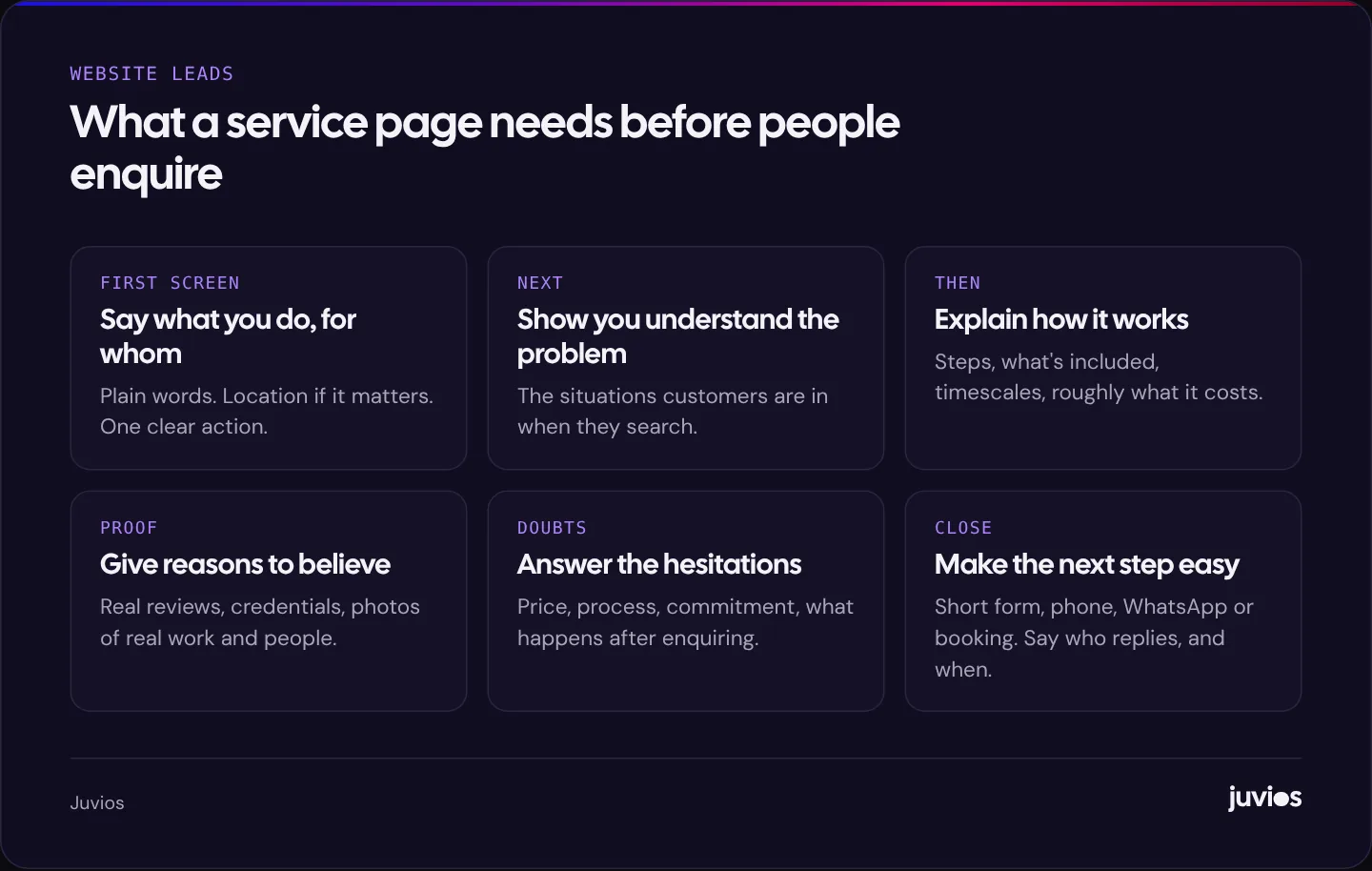
Good service pages start with what the customer is trying to achieve, in their words. Instead of "Comprehensive accounting solutions", try "Year-end accounts and tax returns for limited companies in Colombo". Specific beats clever. Then explain how the service works, what's included, how long it takes and, where you can, roughly what it costs. Visitors who can't find prices often assume they're too high.
 Tap to enlarge
Step 4: Check that visitors trust you
Understanding what you do isn't enough. A visitor also has to believe you'll do it well, and that getting in touch won't waste their time. People look for signals that a business is real, competent and safe to contact.
- Real reviews, ideally from a source the visitor can check, such as your Google Business Profile, rather than unattributed quotes.
- Real people. Names and photos of the team, especially whoever will reply to an enquiry.
- Real work. Photos of projects, examples or case studies, with honest descriptions of what you did.
- Credentials that matter in your industry, such as registrations, insurance and memberships.
- Basic details that show you exist: a business address or service area, a phone number, and how long you've been trading.
Be careful not to invent or inflate any of this. A small number of real, specific reviews persuades more than a wall of generic five-star quotes, and fabricated testimonials can damage your reputation and breach consumer protection rules in many countries.
Step 5: Check that getting in touch is easy
This is where small changes make the biggest difference. A visitor who's ready to enquire should never have to hunt for the way to do it, or fight a form to finish.
Make the next step obvious on every page
Each service page should have a clear call to action near the top and again near the bottom. Use specific labels such as "Get a quote" or "Book a call" rather than "Submit". On mobile, make phone numbers tappable and consider a click-to-WhatsApp link if your customers use it.
Shorten your forms
Every extra field is a reason to stop. Ask only for what you need to reply well: usually a name, a way to contact them and a short description of what they need. If you must qualify leads, a single dropdown such as budget range or service type is often enough. The Nielsen Norman Group's form design guidance is a good reference for labels, errors and field order.
Watch real sessions
Free tools such as Microsoft Clarity record anonymised sessions and show heatmaps of where people click and scroll. Watching twenty sessions on your contact page will show you problems analytics never will: people tapping things that aren't links, error messages they can't see, or a button hidden below the keyboard on mobile. If you use session recording, mention it in your privacy policy and follow the consent rules that apply to your visitors.
Check speed on a phone
Slow pages lose people before they've seen your offer. Test your key pages in PageSpeed Insights, which shows real-user data from Chrome where enough exists. Our Core Web Vitals guide explains how to read the results and what to fix first.
Step 6: Check what happens after someone enquires
Sometimes the website is working and the leads are being lost afterwards. If enquiries arrive but few turn into customers, the problem may be speed of reply, not the site itself.
Look at how long it takes for an enquiry to get a response. For many service businesses, the first business to reply well wins the work. Set up an instant confirmation email that says who will reply and when, route enquiries to someone who's responsible for them, and track how many enquiries turn into calls, quotes and customers.
Not every enquiry is ready to buy. A short, useful email sequence can keep you in mind until they are. We explain how to set one up in B2B email automation workflows, and compare two popular tools in ActiveCampaign vs Mailchimp.
Symptoms and likely causes
If you want a shortcut, match what you're seeing to the most likely cause and the place to check.
| What you see | Most likely cause | Where to check |
|---|---|---|
| Traffic but zero recorded leads | Broken form or tracking | Test the forms yourself; GA4 key events |
| Lots of visitors, very short visits | Wrong audience or slow pages | GA4 traffic acquisition; PageSpeed Insights |
| Blog traffic, no service enquiries | Content attracts readers, not buyers | Search Console queries; internal links to services |
| Visitors reach the contact page but don't submit | Form friction or doubts | Session recordings; form field count |
| Mobile converts far worse than desktop | Mobile layout, speed or tap targets | GA4 device report; test on a real phone |
| Enquiries arrive but few become customers | Slow follow-up or poor fit | Response times; lead source vs outcome |
| Leads only from ads, none from search | Weak organic visibility | Search Console impressions; Google Business Profile |
What to fix first
Once you've worked through the checks, you'll probably have a list. Prioritise by impact and effort. A broken form is high impact and low effort, so fix it today. Rewriting your main service pages is high impact and moderate effort, and usually worth doing next. A full redesign is high effort and should come last, once you know what the new design needs to fix.
- Fix anything broken: forms, phone links, tracking.
- Clarify the message on your top three service pages.
- Add real proof near your calls to action.
- Simplify the enquiry path, especially on mobile.
- Improve speed on the pages that receive the most visitors.
- Tighten follow-up so every enquiry gets a fast, personal reply.
- Then decide whether you need more or better traffic, through SEO, ads or both.
If you reach that last step and you're unsure where to invest, our comparison of Google Ads and SEO sets out how each one works for a small business. And if you've decided a rebuild really is needed, start with what a small business website costs and our website redesign checklist.
Measure the change
Whatever you change, measure before and after. Note your enquiries per month and your conversion rate on key pages before you start, change one major thing at a time where you can, and give each change a few weeks before judging it. Small sites see small numbers, so look at trends over months rather than reacting to a single good or bad week.
The goal isn't a website that looks better. It's one that brings in more of the right enquiries, and gives you the data to keep improving it. If you'd like help finding where your site is losing leads, book a free consultation.
Common questions
01How many leads should my website generate?
It depends on your traffic, your industry and how ready your visitors are to buy. Rather than chasing a benchmark, track your own conversion rate on key pages and work to improve it month by month.
02Do I need a new website to get more leads?
Often not. Fixing tracking, clarifying service pages, adding proof and simplifying forms can make a big difference without a rebuild. Redesign when the site's structure or platform is genuinely holding you back.
03Is it better to have a form or a phone number?
Offer both, plus WhatsApp or booking if your customers use them. Different people prefer different ways to get in touch, and the right mix varies by industry.
Sources
- About key events Google Analytics Help
- Google Search Console Google
- Website Forms Usability: Top 10 Recommendations Nielsen Norman Group
- Microsoft Clarity Microsoft
- PageSpeed Insights Google