On this page · 13 sections
Google Ads is very good at finding more of whatever you tell it to find. If your account counts every page view as a conversion, it will find you cheap page views. If it counts nothing, it bids blind. If it counts real enquiries, it gets better at finding people who enquire. That's why conversion tracking is the first thing we set up on any account, before a single click is paid for. This guide explains what to track for a lead generation business, the two main ways to get conversions into Google Ads, and the extra steps that make the data trustworthy.
Why conversion tracking decides your results
Google Ads uses conversion data in two ways. It reports it, so you can see which campaigns, keywords and ads produce results. And if you use automated bidding strategies such as Maximise Conversions or Target CPA, it uses the same data to decide how much to bid on each search. Smart Bidding is only as smart as the conversions you give it.
Poor tracking causes predictable problems. Counting soft actions such as page views or scroll depth as primary conversions makes costs look low while leads stay flat. Double counting, for example a form tracked by both a Google Ads tag and an imported GA4 event, makes performance look twice as good as it is. Missing phone calls makes good campaigns look bad. Each of these leads to bad decisions, by you and by the bidding algorithm.
Decide what counts as a conversion
Start with a list of every way a customer can contact you from the website, then decide which ones represent real business value. For most lead generation businesses the list looks something like this.
| Action | Primary or secondary | Notes |
|---|---|---|
| Enquiry form submitted | Primary | Track the successful submission, not the button click |
| Call from an ad (call extension or call ad) | Primary | Set a minimum call length so misdials don't count |
| Call from the website | Primary | Needs call tracking with a Google forwarding number or a call tracking tool |
| Booking completed | Primary | Fire on the confirmation step of your booking tool |
| WhatsApp or email link clicked | Primary or secondary | A click isn't a conversation; consider secondary at first |
| Brochure or guide downloaded | Secondary | Useful signal, but rarely as valuable as an enquiry |
| Key page viewed, such as pricing | Secondary | For reporting only; never optimise bidding on it |
Google Ads lets you mark each conversion action as primary or secondary. Primary actions feed the Conversions column and automated bidding. Secondary actions appear in All conversions for reporting. Keeping micro-actions secondary is one of the simplest ways to stop bidding from chasing the wrong thing.
Give conversions values
If some enquiries are worth more than others, use conversion values to say so. A booking for a high-value service might be worth more than a general contact form. Values don't need to be exact; relative values are enough to help bidding prioritise. For e-commerce, pass the actual order value with each purchase.
Two ways to get conversions into Google Ads
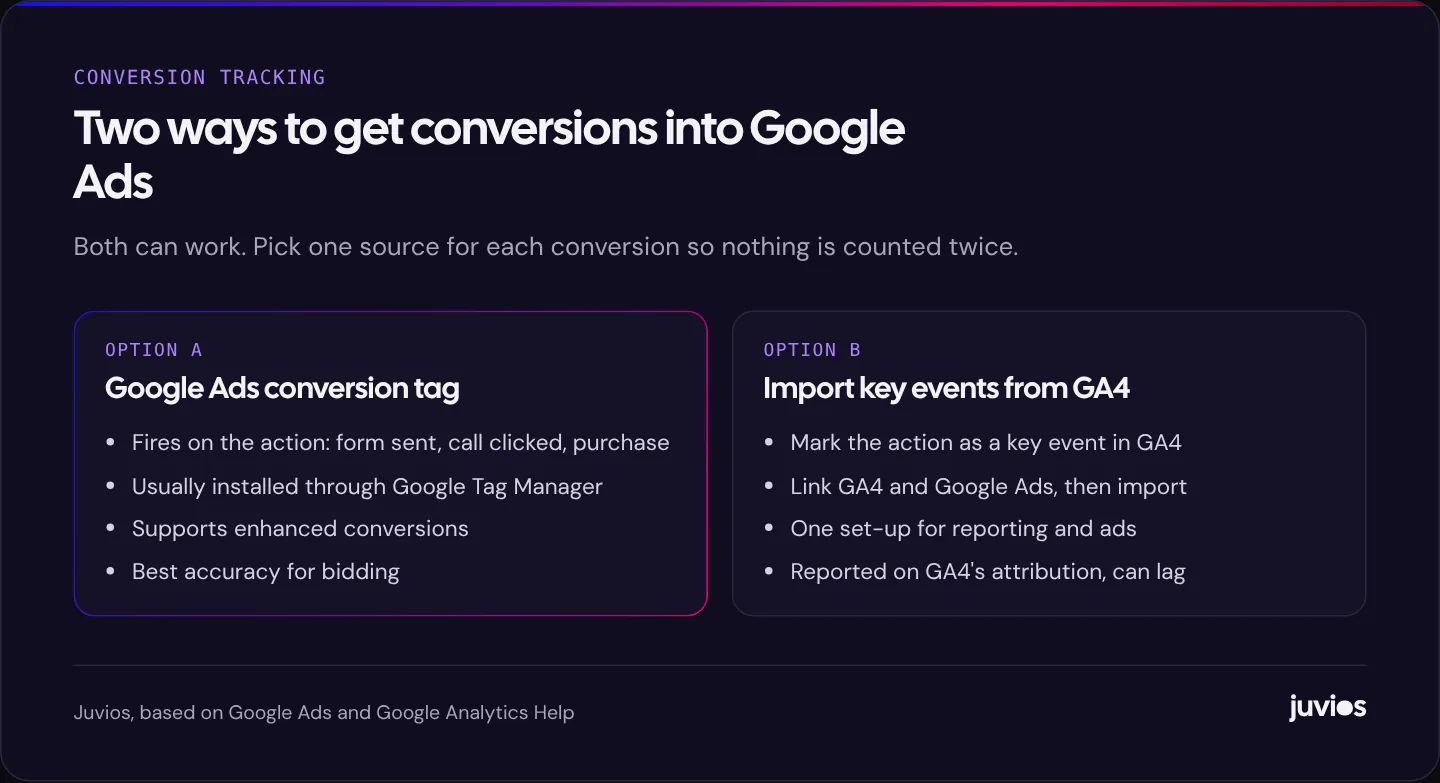
There are two common set-ups, and both are supported by Google. The important rule is to use one source for each conversion action, not both.
The Google Ads conversion tag
You create a conversion action in Google Ads and install its tag so it fires when the action happens, usually through Google Tag Manager. This is the most direct route, it supports enhanced conversions fully, and it's what we use for primary conversions on most lead generation accounts.
Importing key events from Google Analytics 4
Alternatively, you mark actions as key events in GA4, link GA4 to Google Ads, and import them as conversions. This keeps one set of definitions for analytics and ads, which is convenient. The trade-offs are that imported conversions follow GA4's processing and can arrive later, and they're attributed using GA4's rules, so numbers may differ from what a Google Ads tag would record.
 Tap to enlarge
Setting it up properly
The details depend on your website and tools, but a solid set-up for a lead generation site usually follows these steps.
- Install Google Tag Manager on every page of the site, or use the Google tag directly if your platform handles it.
- Make sure the Google tag loads on all pages so Google Ads can record click IDs when visitors arrive from ads.
- Create a conversion action in Google Ads for each primary action, with the right category, value and counting setting. For leads, count "one" conversion per click; for purchases, count "every".
- Trigger each conversion on success: a thank-you page, a form's success event, or a booking confirmation. Avoid triggering on button clicks, which fire even when the form fails.
- Set up call tracking for calls from ads and, if calls matter, from the website.
- Turn on enhanced conversions for leads.
- Test every conversion with Tag Assistant and a real submission, then check it appears in Google Ads.
Testing is the step most often skipped. Submit each form yourself, call each number, and confirm the conversion registers. Then repeat after any website change. Tracking breaks quietly when a form plugin is updated or a page is rebuilt, and a redesign is the most common time for it to fail; see our guide to redesigning without losing rankings for the launch checks we run.
Enhanced conversions
Browsers and privacy settings increasingly limit cookies, which means some conversions can't be linked back to the ad click. Enhanced conversions help close that gap. Google describes them as supplementing your existing conversion tags by sending hashed first-party conversion data, such as an email address entered in a form, using the SHA-256 algorithm. Google then matches that hashed data against signed-in Google accounts to attribute more conversions to the ads that drove them.
For lead generation, enhanced conversions for leads also make offline conversion imports easier, because the hashed email or phone number can be used to match a sale back to the original click. Set-up is usually done in Tag Manager or through the Google tag, and Google Ads shows a diagnostic report confirming whether data is being received.
Because enhanced conversions use personal data, make sure your privacy policy explains it and that it fits the consent you collect. That leads to the next topic.
Consent and privacy
If you have visitors in places with strict privacy rules, such as the UK and EEA, you'll usually need consent before setting advertising cookies, and Google has its own EU user consent policy for advertisers. Google's consent mode lets you pass each visitor's consent choices to Google tags, which then adjust their behaviour. Consent mode doesn't provide a consent banner itself; you need a consent management tool for that.
Rules differ by country, and this isn't legal advice. What matters for tracking is that your consent banner, consent mode and tags are connected correctly, and that you test the whole set-up with consent both accepted and declined. A banner that blocks tags without passing consent signals can silently remove a large share of your conversion data.
Going further: offline conversions
Online conversions tell Google who filled in a form. They don't tell it who became a customer. For businesses with a sales process, such as quotes, consultations or contracts, that difference matters. Two campaigns can produce the same number of enquiries and very different numbers of customers.
 Tap to enlarge
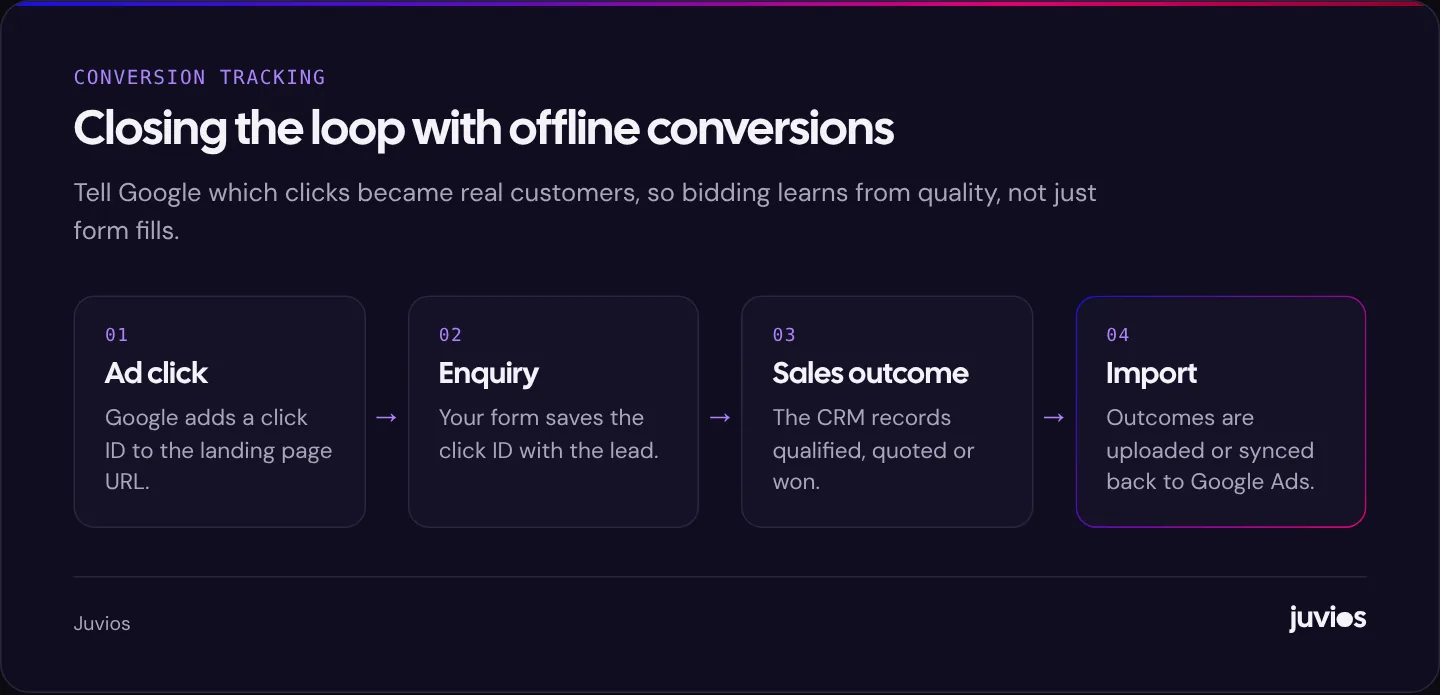
Offline conversion tracking closes that loop. Your website saves the Google click ID, or the user's email with enhanced conversions for leads, alongside each enquiry in your CRM. When a lead is qualified or becomes a customer, that outcome is uploaded to Google Ads, manually, on a schedule or through a CRM integration. Bidding can then optimise towards qualified leads or sales rather than raw form fills.
This is especially useful when a campaign brings lots of enquiries that don't turn into business. Combined with the steps in our guide to lowering your Google Ads cost per lead, it shifts the account from cheap leads towards profitable ones.
Calls, WhatsApp and chat
In many service businesses, especially local ones, more customers phone or message than fill in forms. If you only track forms, your best campaigns may look like your worst.
Calls from ads
Calls made directly from a call asset or a call-only ad can be tracked inside Google Ads. Set a minimum call duration that reflects a real conversation, so that misdials and very short calls don't count as leads.
Calls from your website
When someone clicks an ad, visits your site and then phones the number on the page, Google can track that call using a Google forwarding number that replaces your number on the page for ad visitors. Dedicated call tracking tools, such as CallRail, do the same thing with extra features like recordings and source tracking for every channel. Either way, you'll see which campaigns and keywords produce calls, not just clicks.
WhatsApp and chat
Clicks on a WhatsApp link or a chat button are easy to track, but a click isn't a conversation. Many people open WhatsApp and never send a message. Start by tracking these clicks as secondary conversions, compare them with the conversations you actually receive, and only make them primary if they reliably turn into real enquiries.
Common tracking mistakes
- Tracking button clicks instead of successful submissions, which counts failed and abandoned forms.
- Duplicate conversions from both a Google Ads tag and a GA4 import for the same action.
- Micro-actions set as primary, so bidding optimises for page views or downloads.
- No call tracking in a business where most customers phone.
- Counting every conversion for leads, so one person submitting a form three times counts as three leads.
- Thank-you pages that can be reached directly or are indexed in search, inflating counts.
- Tracking that broke during a site update and wasn't noticed for weeks.
Reporting that the business can use
Once conversions are reliable, the next step is reporting that a business owner can read in a few minutes. Google Ads' own interface is detailed but busy. Many businesses benefit from a simple monthly view, built in Looker Studio or a spreadsheet, that shows spend, conversions by type, cost per conversion, and, where offline data exists, qualified leads and customers.
Keep the report focused on decisions. Which campaigns produced enquiries at a cost the business can afford? Which searches wasted money? What changed this month, and what will change next month? A report that answers those questions is more useful than one that lists every metric the platform offers.
A monthly health check
Once tracking is in place, a short monthly review keeps it honest. Compare the conversions in Google Ads with the enquiries that actually arrived in your inbox or CRM; they won't match exactly, but large gaps point to a problem. Check that every primary conversion action has recorded conversions recently. Review the diagnostics for enhanced conversions. And look at conversion lag before judging recent performance, because some conversions are reported days after the click.
Meta advertising has its own equivalent: the Meta Pixel and Conversions API, which we explain in what small businesses need to set up for Meta. If you're deciding where paid search fits in your wider plan, see Google Ads vs SEO. And if you'd like us to check your set-up, book a free consultation.
Common questions
01Should I use the Google Ads tag or import from GA4?
Either works. We generally use the Google Ads tag for primary lead conversions because it's direct and supports enhanced conversions fully, and keep GA4 for wider reporting. Whatever you choose, don't track the same action both ways.
02Why don't my Google Ads conversions match my enquiries?
Common causes are duplicate tracking, consent settings that block tags, conversion lag, spam submissions and enquiries that didn't come from ads. Compare the two regularly and investigate large gaps.
03Do I need enhanced conversions?
They're recommended because they recover conversions that cookies alone miss and make offline imports easier. Make sure your privacy policy and consent set-up cover them.
Sources
- About enhanced conversions Google Ads Help
- About consent mode Google Ads Help
- EU user consent policy Google
- About key events Google Analytics Help
- About conversion tracking Google Ads Help