On this page · 12 sections
For a business that serves a local area, the map results are often worth more than any other spot on Google. They sit near the top of the page, they show your reviews and phone number, and they reach people who want help now. So it's alarming when you search for your own service and your business isn't there. The cause is usually one of a handful of things, and the first job is to work out which. This guide explains how Google decides what to show, how to diagnose your situation, and the fixes that work for each problem.
First, which problem do you have?
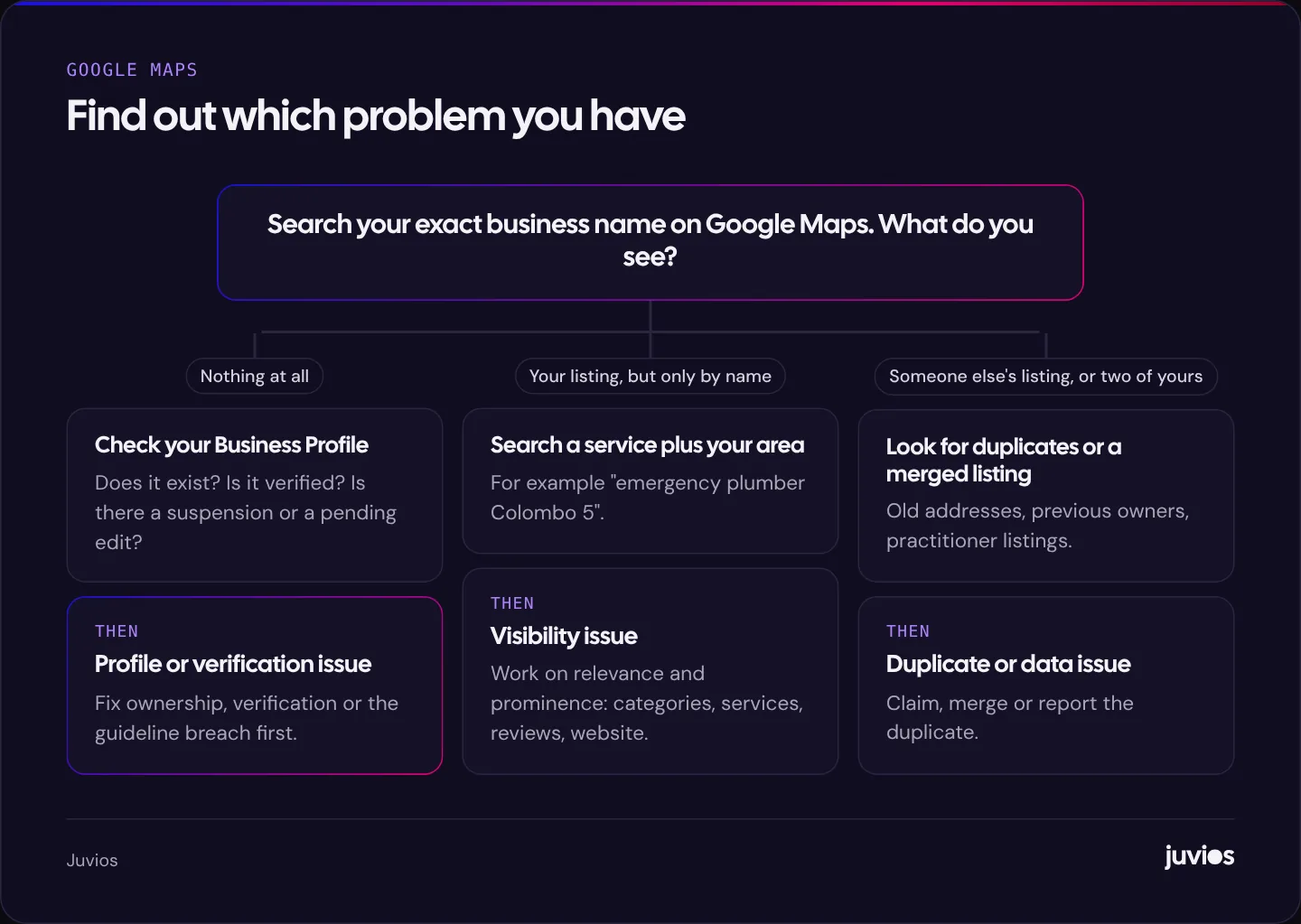
"Not showing on Google Maps" covers two very different situations, and they need different fixes.
The first is that your business can't be found at all, even when you search its exact name. That's a profile problem: the listing doesn't exist, isn't verified, has been suspended, or is being confused with another listing.
The second is that your business appears when you search its name, but not when you search for what you do, such as "accountant near me" or "dentist in Kandy". That's a visibility problem. Your listing exists; it just isn't ranking well enough for those searches.
Searching your exact business name on Google Maps, ideally in a private browser window so your own history doesn't skew the result, tells you which situation you're in.
 Tap to enlarge
How Google decides what to show
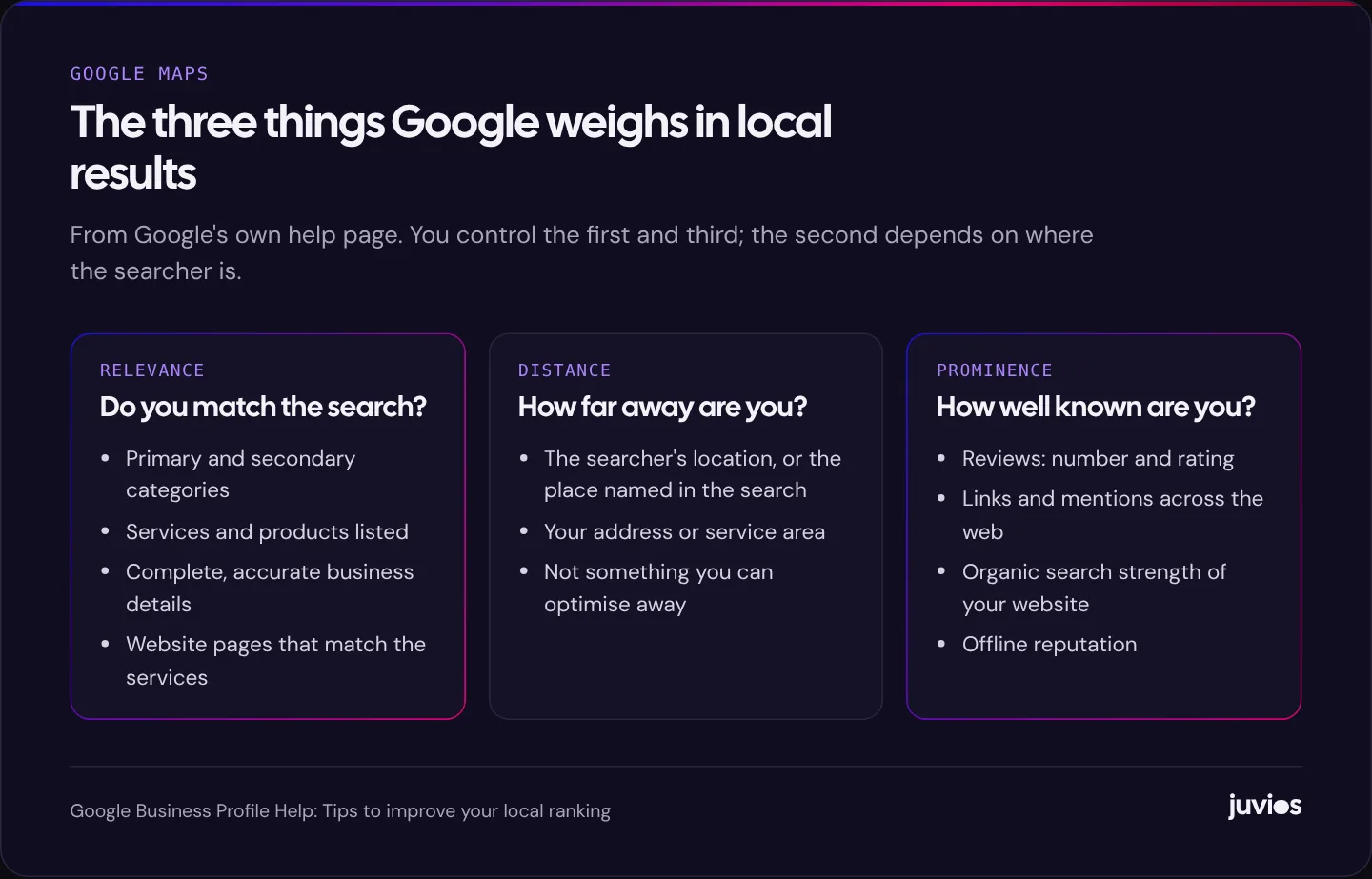
Google explains its approach in its help article on improving your local ranking. Local results, it says, are mainly based on relevance, distance and prominence, which the page also describes as popularity. It also states that there's no way to request or pay for a better local ranking.
Relevance is how well your Business Profile matches what someone searched for. Complete, accurate information helps Google understand what you do. Distance is how far your business is from the searcher, or from the location they named in their search. Prominence is how well known your business is, both online and off, including reviews, links and mentions across the web, and your website's position in ordinary search results.
 Tap to enlarge
Distance explains something that confuses many owners: your ranking changes depending on where the person searching is standing. If you search from your office you may see yourself first, while a customer two kilometres away sees three competitors. That isn't a penalty. It's distance at work, and it's why it helps to check rankings from several locations rather than just your own desk.
The wording of the search matters too. "Plumber", "emergency plumber" and "boiler repair" can each show a different set of businesses, because relevance is judged against the specific search. Make a list of the main ways your customers describe what they need, and check each one rather than assuming a single search tells the whole story.
If you can't find your business at all
You don't have a profile, or someone else controls it
Search for your business on Google Maps and on Google Business Profile. If there's no listing, create one. If there is one but you can't edit it, it may have been created by a former employee, a previous owner or an old agency. Google lets you request ownership of a profile that someone else manages.
The profile isn't verified
Google asks businesses to verify that they're real and that they operate where they say. Depending on your business, verification might be by video, phone, email or post. Until verification is complete, you can't fully manage the profile, and it may not appear reliably. If verification has stalled, check that the details you've entered, especially the address and business name, match what's on your website, signage and other listings.
The profile has been suspended
Profiles are suspended when Google believes they break the guidelines for representing your business. Common causes include adding keywords or locations to the business name, using a virtual office or PO box as an address, listing a service-area business at an address customers can't visit, and having several profiles for the same business at the same place. Fix the cause, then request reinstatement through the support process.
There's a duplicate, or your listing has been merged
Duplicates appear when a business moves, rebrands or is listed separately by a staff member. Google may filter out one of two similar listings, and occasionally the one it keeps isn't yours. Search for your phone number and old addresses to find duplicates, and claim, merge or report them.
If you appear by name but not for your services
This is the more common situation, and it's a matter of improving relevance and prominence relative to the businesses that do appear. Work through these in order.
Choose the right categories
Your primary category is one of the strongest relevance signals in your profile. Pick the most specific category that describes your core business, not the broadest one. Then add secondary categories for other genuine services. Look at the categories that top-ranking competitors use; you'll often find a more precise option than the one you chose when you set up the profile.
Complete everything
Fill in services, products, opening hours, holiday hours, attributes, a description and photos. Keep everything accurate, because incorrect hours or a wrong phone number frustrate customers and can lead to edits suggested by other users. Add real photos of your premises, team and work rather than stock images.
Get more, and more recent, reviews
Reviews are part of prominence, and they're also what persuades a searcher to choose you over the business next to you on the map. Ask every happy customer, make it easy with a short link, and reply to reviews, including critical ones, politely and specifically. Never buy reviews or offer incentives for positive ones; it breaches Google's policies and, in many countries, consumer protection law.
Strengthen your website
Google says your position in web results contributes to prominence, so your website matters to your map ranking. Each main service should have its own page that explains the service, the area you cover and why customers choose you. Use the same business name, address and phone number as your profile. Our guide to SEO basics for small businesses covers the foundations.
Build local mentions and links
Listings in reputable directories, mentions by local organisations, sponsorships, industry associations and local press all help Google understand that your business is established. Quality and relevance matter far more than volume. A mention from the local chamber of commerce does more than a hundred low-quality directory listings.
Asking for reviews the right way
Reviews deserve more attention than they usually get, because they do two jobs at once. They contribute to prominence, and they're the first thing many searchers read when they compare businesses on the map. A profile with a handful of reviews from three years ago looks less active than one with steady, recent feedback, even if the ratings are similar.
The simplest system works best. Ask at the moment the customer is happiest, such as when a job is finished or a problem is solved. Send a direct link to your review form, which you can copy from your Business Profile, by email, text or WhatsApp. Train your team to ask, and make it part of how a job is closed rather than an occasional campaign.
Reply to reviews as well. A short, specific thank-you shows future customers that a real person reads them. A calm, factual reply to a negative review often reassures readers more than the review itself worries them. What you must not do is offer discounts or gifts in exchange for reviews, ask only happy customers through a filtering system designed to hide unhappy ones, or post reviews on behalf of customers. Google's policy on fake engagement prohibits incentivised and fake reviews, and regulators in several countries treat them as misleading advertising.
Local SEO myths worth ignoring
Local search attracts a lot of folklore. These are the claims we hear most often that aren't supported by Google's guidance.
- “Posting every day boosts your ranking.” Posts can be useful for sharing offers and news with people viewing your profile, but there's no evidence that posting frequency on its own lifts rankings.
- “Adding the city to your business name is fine if everyone does it.” It breaks the guidelines. It may work until it doesn't, and suspensions are disruptive.
- “You need hundreds of directory listings.” A smaller number of accurate, reputable listings beats mass submissions to low-quality directories.
- “Geotagging your photos helps.” Add real photos because they help customers. Don't expect hidden location data in image files to move rankings.
- “Ads improve your organic map ranking.” Paying for ads doesn't change organic local rankings. Google says you can't pay for a better local ranking.
A special case: service-area businesses
If you visit customers rather than having them visit you, such as plumbers, cleaners, mobile mechanics or consultants who work on site, Google treats you as a service-area business. You should set a service area and hide your address if customers don't come to it. Listing a home address as a public location is a common cause of suspension.
Service-area businesses still rank based on relevance, distance and prominence, but distance is judged against where your business is based, not the whole of your service area. That's why a business based in one suburb can struggle to rank in a suburb on the other side of the city, however large its service area is set. Location pages on your website and genuine local mentions can help in the areas you want to grow into, but they won't fully override distance.
A quick diagnostic table
| What you see | Likely cause | What to do |
|---|---|---|
| No listing for your name | No profile, or not verified | Create or claim the profile and complete verification |
| "Profile suspended" in your dashboard | Guideline breach | Fix the name, address or duplicate issue, then request reinstatement |
| Old address or phone number showing | Duplicate or outdated listing | Search old details, then claim, merge or report duplicates |
| Found by name, not by service | Low relevance or prominence | Better categories, complete profile, reviews, service pages |
| Visible near your office only | Distance | Expected. Strengthen prominence and check from several locations |
| Ranking dropped suddenly | Recent edit, new competitor or suspension | Check recent changes and the profile's status; review competitors |
How to measure progress
Your Business Profile's performance view shows how many people found you on Search and Maps, the searches used, and actions such as calls, website clicks and direction requests. Track those monthly. Combine them with analytics on your website, where clicks from the profile can be tagged with UTM parameters so you can see which ones lead to enquiries.
Because rankings vary with the searcher's location, a single check from your own phone is misleading. If local search is central to your business, use a rank tracker that checks from a grid of points across your area, or at least check manually from a few different places.
Local results also sit alongside ads. If you need visibility while your profile builds strength, local search ads can fill the gap. Our comparison of Google Ads and SEO explains how the two work together.
How long it takes
Profile problems such as verification and duplicates can often be fixed within days or a few weeks, depending on how quickly Google processes requests. Suspensions take longer and depend on review times. Visibility improvements are slower: categories and profile updates can show effects fairly quickly, while reviews, links and website improvements build over months.
If you've worked through this guide and you're still not showing where you'd expect, the cause may be a stronger set of competitors rather than a fault in your profile. That's when a structured local SEO plan helps. If your website gets visitors from the map but they don't enquire, read why your website isn't generating leads. And if you'd like us to look at your profile with you, book a free consultation.
Common questions
01Can I pay Google to rank higher on Maps?
No. Google states there's no way to request or pay for a better local ranking. You can run ads that appear in map results, but they are labelled as ads and are separate from the organic listings.
02Do I need a physical address to appear on Google Maps?
No. Service-area businesses can appear without showing an address, as long as they set a service area and meet Google's guidelines.
03Why does my business show up for me but not for my customers?
Local results depend on the searcher's location. Your business may rank well near your premises and less well further away. Check from several locations to see the real picture.
Sources
- Tips to improve your local ranking on Google Google Business Profile Help
- Guidelines for representing your business on Google Google Business Profile Help
- Google Business Profile Google
- Fake engagement policy Google Maps User Contributed Content Policy