On this page · 15 sections
ActiveCampaign and Mailchimp are two of the most widely used email marketing platforms for small businesses, and they're the two we work in every day at Juvios. On the surface they do the same job: build a list, send campaigns, automate follow-ups. In practice they're designed around different ideas of what email is for. Mailchimp makes it easy to send good-looking campaigns to a list. ActiveCampaign is built around automation that responds to what each person does, with sales tools close at hand. This guide explains the differences that matter and helps you work out which one fits your business.
The short answer
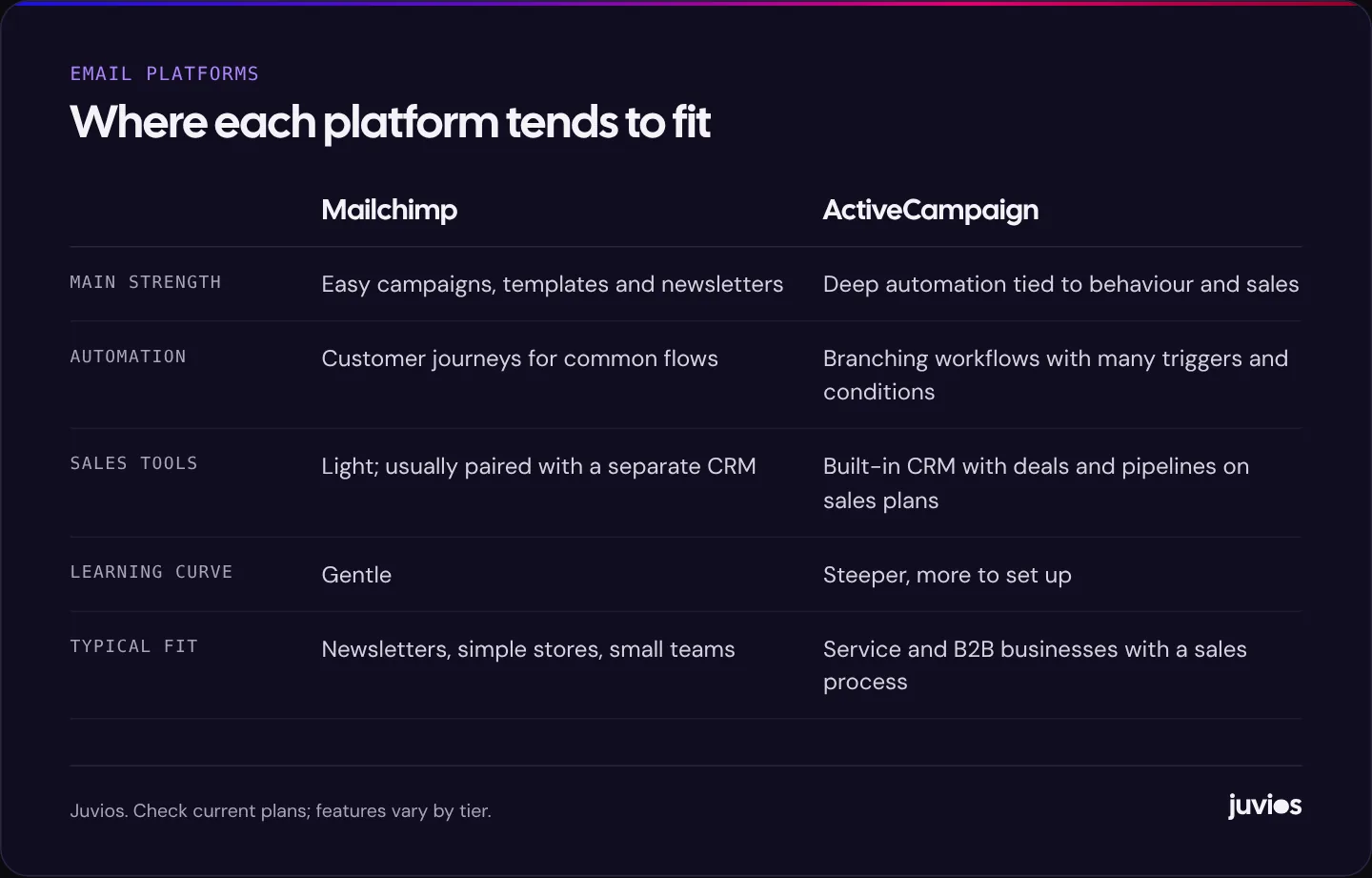
If your email marketing is mostly newsletters, announcements and offers, with a few simple automations such as a welcome series or an abandoned cart reminder, Mailchimp is usually the easier choice. It's quick to learn, its templates are good, and it integrates with a long list of tools.
If your business depends on following up leads, nurturing prospects over weeks or months, or connecting email with a sales process, ActiveCampaign is usually the stronger choice. Its automation builder handles more complex logic, it tracks what contacts do on your website and in your emails, and its sales plans add a CRM with deals and pipelines.
Many businesses could succeed on either. The question is which one will make the emails you need easier to build, and which one your team will actually use.
 Tap to enlarge
Sending campaigns
Mailchimp, owned by Intuit, made its name on campaigns, and it still shows. The email builder is approachable, templates are well designed, and getting a newsletter from idea to inbox is quick. It also offers landing pages, sign-up forms and social posting in the same account, which suits small teams who want one place for basic marketing.
ActiveCampaign's campaign builder is capable and has improved a lot, with a modern drag-and-drop editor and templates. It's perfectly good for newsletters, but campaigns aren't where it stands out. Most teams who choose it do so for what happens around the campaigns: segmentation, automation and follow-up.
For both, the quality of your emails depends far more on what you write and who you send it to than on the editor. A well-segmented list with useful content will outperform a beautiful template sent to everyone.
Automation: the biggest difference
Automation means emails that send themselves when someone does something, such as joining your list, enquiring, buying or going quiet. Both platforms do it, but in different depth.
Mailchimp
Mailchimp's Customer Journey Builder covers the common flows well: welcome series, birthday emails, abandoned carts, post-purchase follow-ups and re-engagement. You choose a starting point, add steps and simple conditions, and the journey runs. For many small businesses, that's everything they need, and the pre-built journeys make it quick to start.
ActiveCampaign
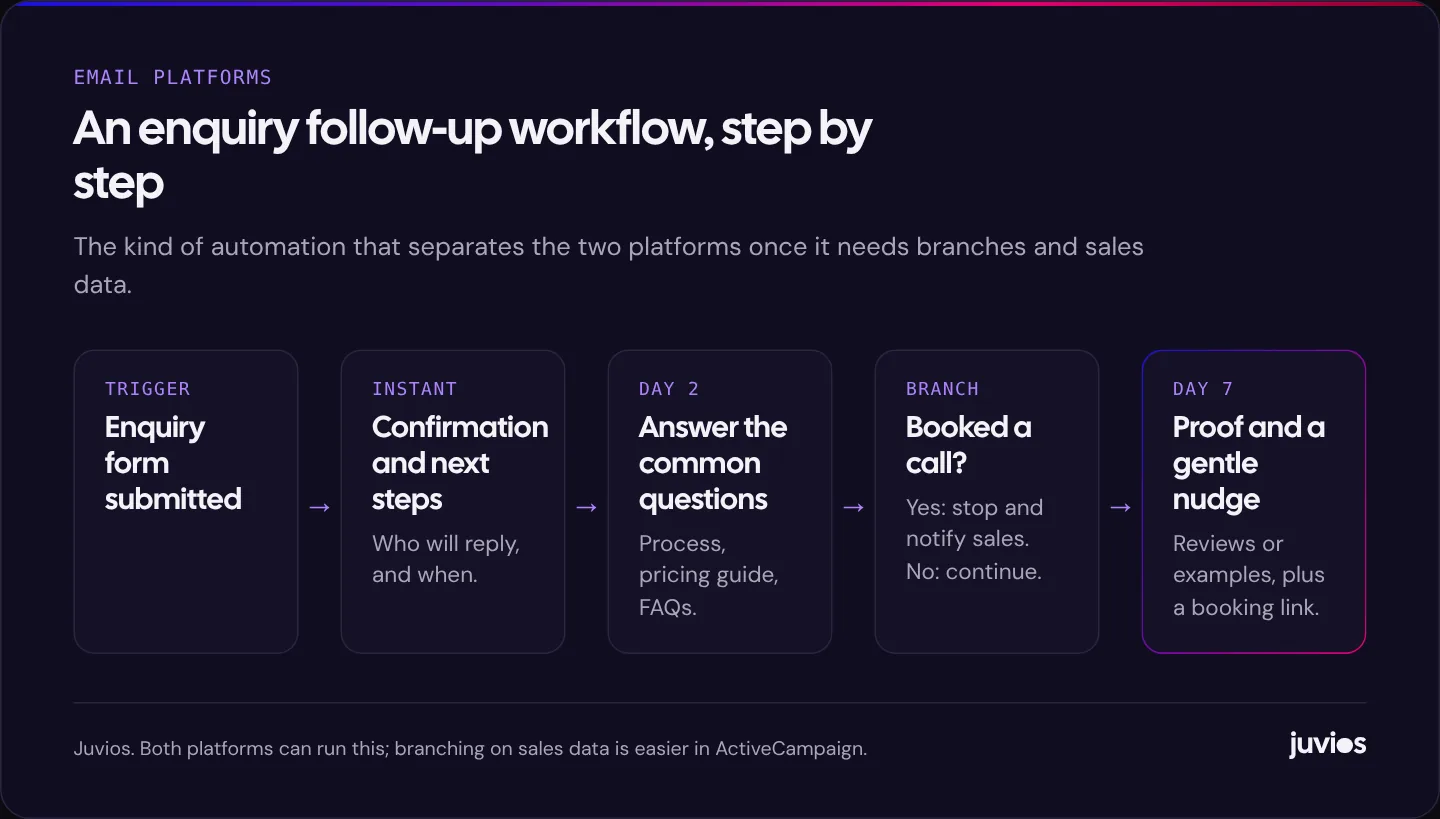
ActiveCampaign's automation builder is its core. Workflows can start from many triggers, including form submissions, tags, website visits, link clicks, purchases and changes to a deal in the CRM. They can branch on almost any condition, wait for specific events, update contact fields, score leads, notify your sales team, and move contacts between automations. That makes it suited to longer journeys where what someone receives depends on what they've done.
 Tap to enlarge
If you're not sure what to automate first, our guide to B2B email automation workflows lists the sequences that tend to pay off soonest, starting with enquiry follow-up and lead nurturing.
Segmentation and personalisation
Both platforms let you segment contacts by fields, tags, activity and purchase history, and personalise emails with merge fields and conditional content. The difference, again, is depth.
Mailchimp's audience tools work well for straightforward segments such as customers who bought in the last 90 days or subscribers interested in a particular topic. Its documentation recommends keeping one main audience and using tags, groups and segments within it rather than creating many separate lists.
ActiveCampaign treats contacts as one database with tags, custom fields and lists, and its site and event tracking can record which pages someone visited and what they clicked. Combined with lead scoring, that lets you build segments such as "visited pricing twice this week and opened the last two emails", which is useful when you're trying to spot people ready for a sales conversation.
CRM and sales features
This is where the two diverge most for service businesses. ActiveCampaign's sales plans include a CRM with deals, pipelines, tasks and sales automation. A lead can arrive through a form, enter an email sequence, be scored, become a deal for your sales team, and trigger different emails depending on which pipeline stage it reaches, all in one system.
Mailchimp isn't designed as a sales CRM. It stores contact and customer data for marketing, and most businesses that need a sales pipeline pair it with a separate CRM such as HubSpot, Pipedrive or Salesforce, connected through an integration. That's a perfectly good set-up, but it's two systems to manage and keep in sync.
E-commerce
Both platforms connect to the major store platforms and can send product recommendations, abandoned cart emails and post-purchase sequences. Check how each connects to your specific store, what data it syncs (orders, products, customer history), and which automations come ready-made. For Shopify and WooCommerce stores, it's also worth comparing them with e-commerce-focused email tools, which are a strong option if your business is purely online retail.
If you're still choosing a store platform, see Shopify vs WooCommerce.
Pricing: how to compare fairly
Both vendors price by the number of contacts and by plan tier, and both change their plans and limits regularly. Rather than repeat figures that will date, here's how to compare them for your situation.
- Check the current pricing pages for Mailchimp and ActiveCampaign at your actual contact count, in your currency.
- Check which features you need are included in the tier you'd buy. Automation depth, number of users, CRM features and reporting often sit in higher tiers.
- Look at how each counts contacts. Unsubscribed and inactive contacts may still count towards your limit, so cleaning your list can reduce costs.
- Consider sending limits and what happens if you exceed them.
- Add the cost of any extra tools you'd need, such as a separate CRM alongside Mailchimp.
A plan that looks cheaper can end up dearer once you add the CRM, landing pages or extra users you need. Compare the total cost of the set-up that does the job.
ActiveCampaign vs Mailchimp at a glance
| Mailchimp | ActiveCampaign | |
|---|---|---|
| Best known for | Easy, attractive campaigns | Advanced marketing automation |
| Automation | Customer journeys for common flows | Complex, branching workflows with many triggers |
| Website and event tracking | Basic | Detailed site and event tracking |
| Lead scoring | Limited | Built in on many plans |
| Sales CRM | Not a sales CRM; pair with one | Built-in CRM with deals on sales plans |
| Ease of use | Very approachable | More powerful, more to learn |
| Extras | Landing pages, forms, social posting | Forms, landing pages, SMS and more by plan |
| Good fit | Newsletters, retail, small teams | Service, B2B and lead-driven businesses |
Reporting and measuring results
Both platforms report opens, clicks, unsubscribes and bounces for each campaign and automation. Treat open rates with caution: privacy features in some email apps load images automatically, which can make opens look higher than they are. Clicks, replies and the actions people take afterwards are more reliable signals.
The more useful question is what email brings in. Connect each platform to your website analytics with tagged links, so you can see visits, enquiries and sales from email in Google Analytics. With ActiveCampaign's CRM, you can also see which emails a contact received before becoming a deal. With Mailchimp, store integrations report revenue from campaigns and automations for e-commerce businesses.
Deliverability is mostly on you
People often ask which platform gets more emails into inboxes. Both are established senders with good infrastructure. In practice, deliverability depends mainly on things you control: authenticating your sending domain with SPF, DKIM and DMARC, sending only to people who asked to hear from you, removing contacts who never engage, and sending content people want.
Google and Yahoo introduced stricter requirements for bulk senders in 2024, including domain authentication and easy unsubscribes. Google's email sender guidelines set out what's expected. Both platforms support these requirements, but you still need to set up authentication on your own domain.
Three example businesses
To make the differences concrete, here's how we'd think about three common types of business. These are illustrations, not client stories.
A café or shop with a newsletter
The goal is a monthly email with news, events and offers, a welcome email for new subscribers and perhaps a birthday reward. The owner writes the emails between other jobs. Mailchimp is the natural fit: quick to learn, good templates, and its simpler journeys cover everything needed. ActiveCampaign would work, but most of its power would go unused.
An accounting or consulting firm
Enquiries arrive through the website, each one needs a fast, personal reply, and many prospects take weeks to decide. The firm wants to send useful content to prospects, remind them about deadlines, and alert a partner when someone shows strong interest. ActiveCampaign's branching automations, lead scoring and built-in CRM fit this closely. Mailchimp plus a separate CRM could do it, but with more glue between systems.
A growing online store
The store needs abandoned cart emails, post-purchase sequences, win-back campaigns and product recommendations, all driven by order data. Both platforms can do this through store integrations, so the decision comes down to how deep the automation needs to go and how well each integrates with the specific store platform. It's also worth trialling an e-commerce-specialist tool before deciding.
Switching from one to the other
Moving platforms is very doable, but it's more than an export and import. Contacts, tags and custom fields move fairly easily. Automations, templates, forms and integrations usually need to be rebuilt in the new platform, and that's where most of the time goes.
Plan the move in stages. Clean your list first, removing bounced and long-inactive contacts so you don't pay to migrate them. Rebuild your most important automations, starting with lead follow-up and welcome series, and test them thoroughly. Update every sign-up form on your website so new contacts go to the new platform. Warm up sending gradually from the new account if your list is large, and keep the old account until you're sure nothing is still feeding into it.
Before switching, ask whether the problem is really the platform. Many businesses that want to move are using a fraction of what their current tool can do. A few well-built automations in the platform you already have can be worth more than a migration.
How to choose
Ask these questions, and the answer usually becomes clear.
- Is email mainly for newsletters and offers, or for following up and nurturing leads? Newsletters point to Mailchimp; lead follow-up points to ActiveCampaign.
- Do you have, or need, a sales pipeline? If yes and you don't already have a CRM, ActiveCampaign's sales features are a strong reason to choose it.
- Who will build and maintain the emails? If it's a busy owner with an hour a week, Mailchimp's simplicity is a real advantage.
- What do you already use? Moving platforms takes effort. If your current platform does what you need, improving how you use it often beats switching.
At Juvios we work in both. If you're already on one of them, we'll usually pick up where you are. If you don't have a platform yet, we'll help you choose the one that suits your size, budget and the way you win customers.
Email works best as part of a wider system that brings in leads and follows them up. For the bigger picture, see building a simple lead generation funnel and why your website isn't generating leads, or book a free consultation.
Common questions
01Is ActiveCampaign better than Mailchimp?
For complex automation and sales follow-up, usually yes. For straightforward campaigns and newsletters, Mailchimp is often easier and perfectly capable. The better platform is the one that fits how your business uses email.
02Can I move from Mailchimp to ActiveCampaign?
Yes. Contacts, tags and fields can be exported and imported, and ActiveCampaign offers migration help. Automations and templates usually need rebuilding, so plan time for that.
03Do I need a CRM as well as an email platform?
If you have a sales process with quotes, calls or follow-ups, a CRM helps. ActiveCampaign includes one on its sales plans; with Mailchimp you'd usually connect a separate CRM.
Sources
- Mailchimp pricing Mailchimp
- ActiveCampaign pricing ActiveCampaign
- Email sender guidelines Google Workspace Admin Help
- Mailchimp Intuit Mailchimp
- ActiveCampaign ActiveCampaign