On this page · 13 sections
Shopify and WooCommerce are the two platforms most small and mid-sized online stores end up choosing between. Both can run a serious business. Both have thousands of themes and extensions. And both have fans who'll tell you the other one is a mistake. The honest answer is that they suit different kinds of businesses, and the deciding factor is rarely a feature list. It's who will look after the store, how much control you need, and how you want your costs to behave as you grow.
Two different models
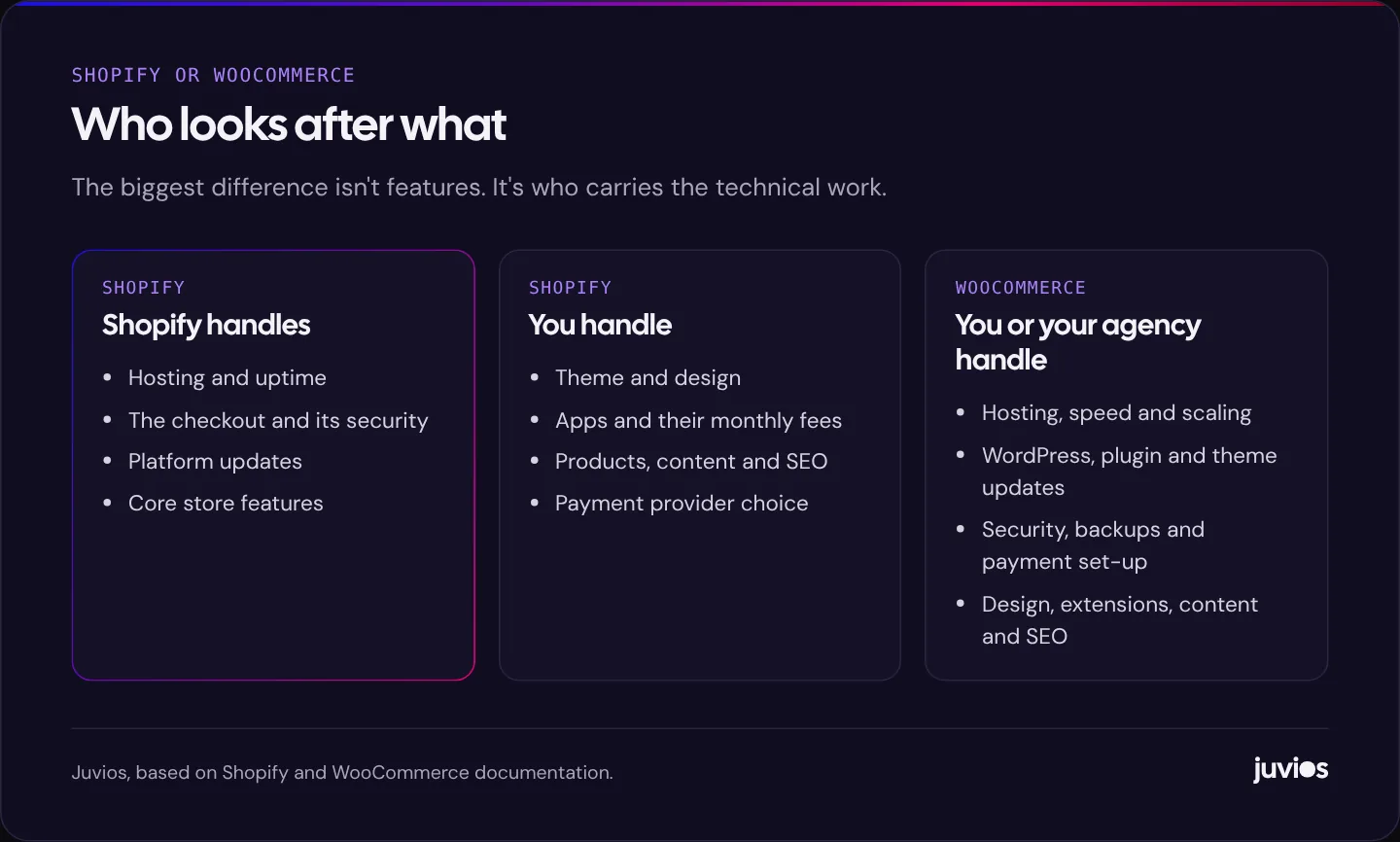
Shopify is a hosted platform. You pay a monthly subscription and Shopify runs the servers, the checkout, the security and the software updates. You design the store with a theme, add features with apps from the Shopify App Store, and manage products and orders in Shopify's admin. You can't install Shopify on your own server; you work within the platform.
WooCommerce is a free, open-source plugin that turns a WordPress site into a store. You choose your own hosting, install WordPress and WooCommerce, and extend it with plugins and extensions, many of them paid. You have access to the code and the database, which means you can change almost anything. It also means you, or the people you hire, are responsible for keeping it fast, secure and up to date.
Put simply, Shopify sells you a managed service and WooCommerce gives you a toolkit. Neither is better in the abstract. A managed service is wonderful when you'd rather spend your time selling. A toolkit is wonderful when you need something the service won't let you do.
 Tap to enlarge
How the costs behave
Comparing prices is tricky because the two platforms charge in different places. Rather than quote numbers that will be out of date by the time you read this, here's where the money goes on each. Always check the current figures on the vendors' own pages.
Shopify
- A monthly or annual plan. Plans differ by features, staff accounts and card processing rates. Prices vary by country, so check Shopify's pricing page for your region.
- Payment processing fees on each order. Shopify's own pricing page notes that third-party transaction fees may apply when you use a payment provider other than Shopify Payments, with the rate depending on your plan.
- App subscriptions. Many useful features, from reviews to subscriptions to advanced filtering, come from apps that charge monthly. These add up and are the cost most merchants underestimate.
- A premium theme, if you buy one, and any design and development work.
WooCommerce
- Hosting. This is the big variable. A small store can run on modest hosting; a busy one needs good managed WordPress hosting or more, and the price climbs with traffic.
- Payment gateway fees, charged by whichever processor you connect, such as Stripe, PayPal or WooPayments where it's available.
- Paid extensions and premium plugins, usually licensed yearly.
- Maintenance time. Updates, testing, backups and security monitoring take hours every month, whether you do them or pay someone.
The pattern is that Shopify's costs are more predictable but rise with apps and plan upgrades, while WooCommerce's software costs can be lower but its time and hosting costs are more variable. For a store with no technical help, Shopify's predictability is often worth paying for. For a store with a developer already on hand, WooCommerce's flexibility can be cheaper overall.
What happens as you grow
Growth tests both platforms in different ways. On Shopify, more traffic is Shopify's problem rather than yours, which is a real advantage during a sale or a viral moment. What grows instead is your app stack and sometimes your plan. Shopify also offers an enterprise tier for large merchants who need more.
On WooCommerce, more traffic is your problem. A store with a large catalogue, lots of concurrent shoppers or complex queries needs better hosting, caching that's configured carefully around carts and checkouts, and someone who knows how to profile a slow WordPress database. That's all solvable, and many large stores run on WooCommerce, but it takes skill and budget.
The other growth question is complexity. If your business adds wholesale pricing, custom product builders, subscriptions with unusual rules or integrations with an ERP, WooCommerce's open code makes it possible to build almost anything. On Shopify you'll be choosing among apps and the platform's extension points, which cover a great deal but not everything.
SEO and content
Both platforms can rank well. Search engines care about product and category pages that are useful, fast and well organised, not about the platform underneath. That said, they feel different to work with.
WooCommerce sits on WordPress, which is a strong content platform. If your store depends on guides, recipes, comparisons or a busy blog, having the store and the content in one system is a genuine advantage. You also have full control over URL structures, structured data and technical settings.
Shopify handles the basics well, including editable titles and descriptions, automatic sitemaps and canonical tags. Its URL structure is fixed, with paths such as /products/ and /collections/, and its blogging tools are simpler than WordPress's. For most stores that's fine. For content-heavy brands, it's worth testing whether the editor suits your team before you commit.
Whichever you choose, the store's speed matters, especially on mobile product pages with large images. Our guide to improving Core Web Vitals covers the fixes that apply to both.
Tracking and advertising
If you plan to advertise, check how each platform connects to Google and Meta. Shopify has official sales channel integrations for both, which handle much of the tracking set-up. WooCommerce relies on plugins or a tag manager set-up, which is more flexible and more fiddly. Either way, test that purchases and their values reach your ad platforms accurately, because the ad algorithms optimise on that data. We explain the Meta side in Meta Pixel and Conversions API.
Running the store day to day
Most of the time you spend on a store isn't spent on design or technology. It's spent adding products, processing orders, answering customers, running promotions and checking stock. So it's worth asking which admin your team will find easier to live in.
Shopify's admin is purpose-built for commerce. Orders, products, customers, discounts and reports sit in one consistent interface, and there's a mobile app for managing the store on the go. Staff accounts with different permissions are built in, with limits that depend on your plan. Most people find it quick to learn.
WooCommerce lives inside the WordPress dashboard, alongside your pages and posts. That's convenient if your team already uses WordPress, and it keeps content and commerce in one place. The admin can feel less streamlined, and its look and behaviour depend partly on which extensions you've installed. Busy stores often add plugins for order management, inventory or reporting that Shopify includes by default.
Before deciding, ask whoever will run the store every day to try both. Free trials and demo stores make this easy, and an afternoon spent adding products and processing a test order tells you more than any comparison article.
Think about the people who'll help you, too. Shopify has a large community of designers, developers and app builders who specialise in it. WooCommerce benefits from the much wider WordPress world. Either way, it's worth knowing that you can find help locally or remotely when you need it, and that your store won't depend on one person.
Payments and checkout
The checkout is where a store earns or loses its money, so it deserves its own look. Shopify's checkout is hosted and standardised. You can brand it and, depending on your plan, extend it, but you can't rebuild it from scratch. The upside is that it's fast, familiar to shoppers, and kept secure and up to date for you. It also supports accelerated payment options such as Shop Pay and digital wallets without extra development.
WooCommerce's checkout lives on your own site, built from WordPress blocks or your theme's templates. You can change almost every step, add fields, restructure the flow or build a completely custom experience. That flexibility is valuable for unusual sales, such as B2B orders with purchase-order numbers or made-to-order products with complex options. It also means checkout performance and reliability depend on your hosting and on every plugin that touches the cart.
Payment providers matter in both cases. Check which gateways are available in your country and currency, what each charges per transaction, and how quickly payouts reach your account. If you sell internationally, also check how each platform handles multiple currencies, local payment methods and taxes in the markets you serve.
Common mistakes when choosing
Comparing the plan price with a free plugin
The most common error is putting Shopify's monthly fee next to WooCommerce's zero and calling it settled. A WooCommerce store has real costs; they just arrive as hosting bills, extension renewals and hours of upkeep. Compare full-year totals.
Underestimating apps
On the Shopify side, merchants often add apps one at a time without tracking the total. Each one also adds code to the storefront, which can slow product pages. Review your apps every few months and remove any you no longer need.
Choosing for a future you may never reach
Some businesses pick WooCommerce because they might one day need total flexibility, then spend years paying to maintain power they never use. Others pick Shopify for simplicity and then fight the platform because their product genuinely needed custom logic. Choose for the store you'll realistically run over the next two or three years.
Migrating without a redirect plan
Product and collection URLs almost always change when you switch platform. Without redirects from the old URLs to the new ones, you lose rankings and break links from other sites, emails and ads. Map every product, category and important page before you move.
Shopify vs WooCommerce at a glance
| Shopify | WooCommerce | |
|---|---|---|
| Model | Hosted subscription platform | Free plugin for self-hosted WordPress |
| Hosting and security | Included and managed by Shopify | Your responsibility, or your host's and agency's |
| Ease of setup | Quicker to launch for standard stores | More set-up and configuration |
| Flexibility | Wide, within the platform's rules | Near-total, with access to code and data |
| Main running costs | Plan, apps, payment fees | Hosting, extensions, payment fees, maintenance time |
| Content and blogging | Capable but simpler | Strong, because it's WordPress |
| Scaling traffic | Handled by the platform | Needs better hosting and tuning |
| Leaving later | Export data; rebuild the design elsewhere | Move hosts freely; you hold the code |
Questions that settle it
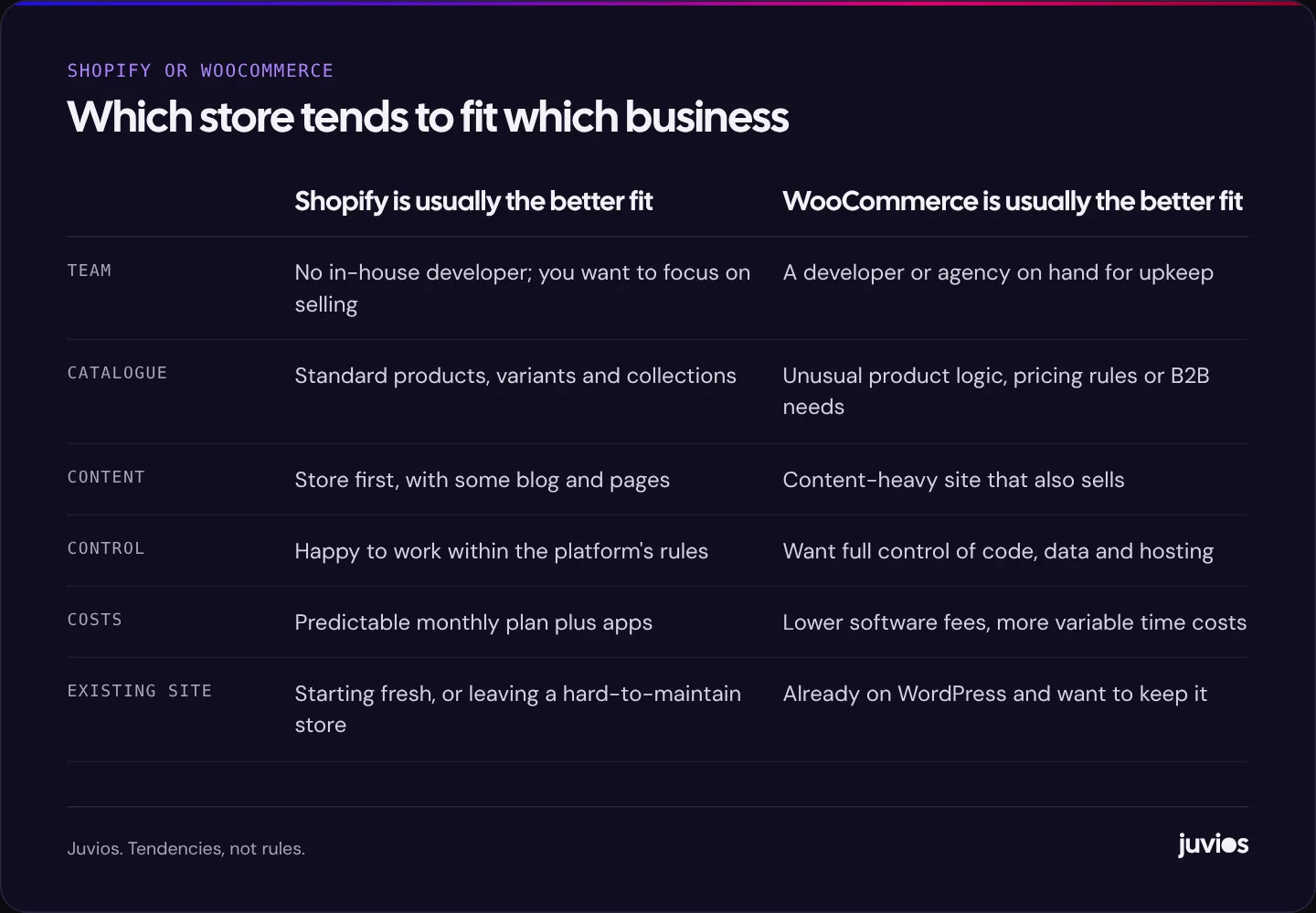
If you're still undecided, answer these honestly. They usually point clearly one way.
- Who will look after the store day to day? If there's no developer, lean towards Shopify.
- Is your site already on WordPress with a lot of content? If yes, WooCommerce keeps everything in one place.
- Do you need product or pricing logic that's unusual for your industry? If yes, check whether Shopify apps genuinely cover it before choosing it.
- How do you want costs to behave? Predictable and monthly suits Shopify. Lower software spend with more variable labour suits WooCommerce.
- How much control do you need over data and hosting? If it must be full control, WooCommerce.
 Tap to enlarge
Our view
At Juvios, most of the stores we build go on Shopify, and we use WooCommerce when there's a good reason, such as a content-heavy WordPress site that needs to sell, or product logic that would be awkward elsewhere. That isn't loyalty to a brand. For a typical growing store without a technical team, a managed platform removes a whole category of problems, and the money saved on upkeep can go into marketing instead.
If you're moving from one platform to the other, treat it as a migration and protect your search traffic. The steps in redesigning without losing rankings apply just as much to a replatform as to a redesign. And if you're starting from scratch, our guide to WordPress vs a custom build covers the wider platform question.
Common questions
01Is WooCommerce really free?
The plugin is free. Running a store isn't: you'll pay for hosting, a domain, payment processing and usually some paid extensions, plus the time to maintain it.
02Is Shopify better for SEO than WooCommerce?
Neither is inherently better. Shopify covers the basics with less effort; WooCommerce offers more control and stronger content tools. Rankings depend on how the store is built and what's on the pages.
03Can I move from WooCommerce to Shopify, or the other way?
Yes. Products, customers and orders can be migrated with tools or a developer. Plan URL redirects carefully, because product and category URLs usually change.
Sources
- Shopify pricing and plan FAQ Shopify
- WooCommerce documentation WooCommerce
- Site moves with URL changes Google Search Central