On this page · 11 sections
A new website should be a step forward. Too often it's a step back in search: the redesign launches, it looks far better, and within weeks organic traffic and enquiries fall because pages that used to rank have disappeared or changed address. The good news is that this is almost entirely preventable. Google publishes clear guidance on moving pages, and the work involved is methodical rather than mysterious. This guide walks through it from the first planning meeting to the weeks after launch.
Why redesigns lose rankings
Search engines rank individual pages, not websites as a whole. Each page that ranks has built up signals over time: the content on it, the links pointing to it from other sites and from inside your own site, and the history of people finding it useful. A redesign can break those signals in a few predictable ways.
- URLs change without redirects. The old address returns a 404 error, the links pointing at it lead nowhere, and Google eventually drops it.
- Content is cut or merged carelessly. A detailed service page becomes a short paragraph on a combined page, and it no longer answers the searches it used to.
- Titles, headings and internal links change. The page still exists, but the signals that told search engines what it was about are weaker.
- Technical settings carry over from staging. A "noindex" tag or a blocking robots.txt rule is left in place after launch.
- The new site is slower or harder to crawl, for example because content only appears after JavaScript runs.
Each of these is avoidable with planning. The rest of this guide is about doing that planning properly.
 Tap to enlarge
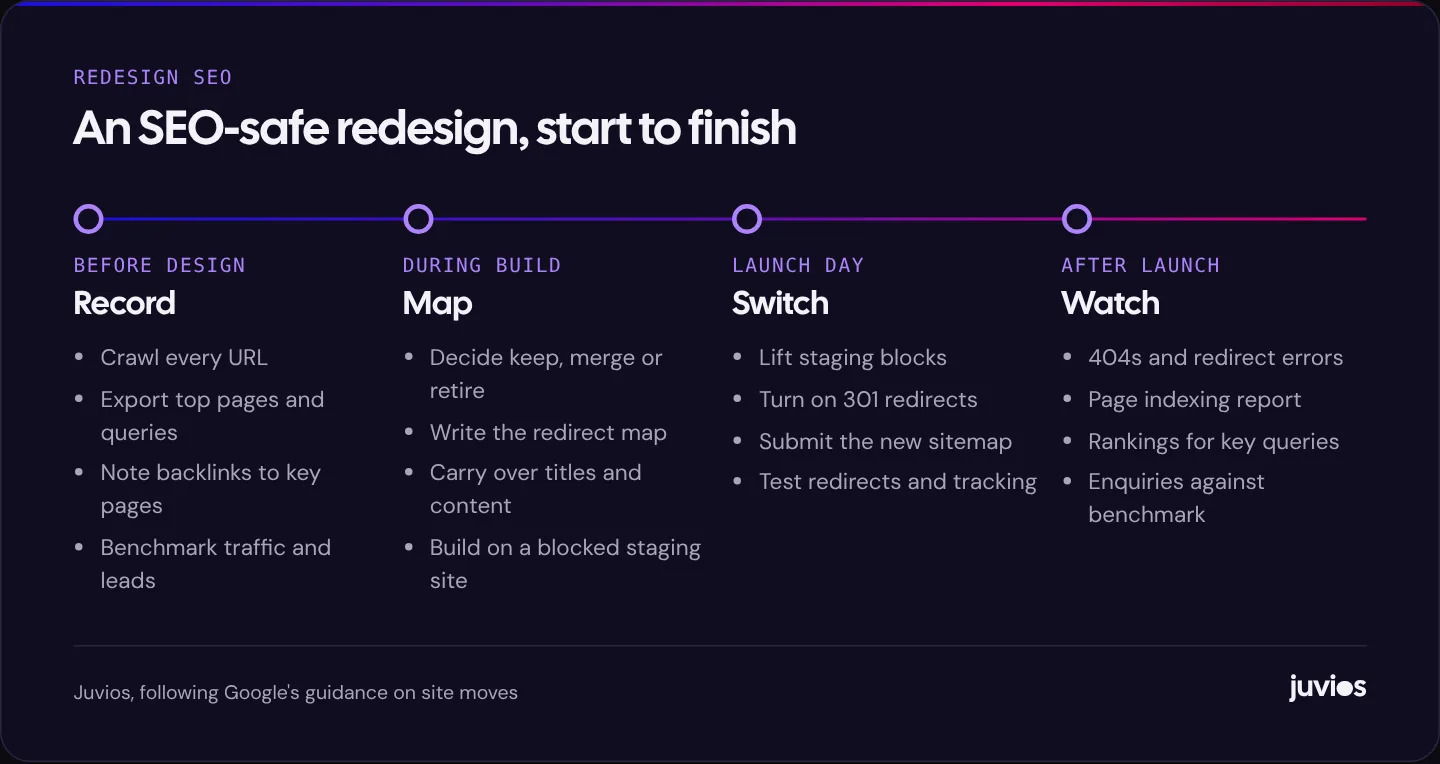
Before design starts: record what you have
You can't protect what you haven't measured. Before anyone starts designing, take a full snapshot of the current site and how it performs.
Crawl every URL
Use a crawler such as Screaming Frog SEO Spider, Sitebulb or a similar tool to list every page on the current site, along with its title, meta description, headings, status code and canonical tag. Combine that with your XML sitemap and a list of URLs from analytics, because crawlers only find pages that are linked, and old campaign pages or PDFs are often orphaned.
Export performance data
From Google Search Console, export the pages and queries that earn clicks and impressions, ideally for the last twelve to sixteen months so seasonal pages show up. From analytics, export the pages that bring in enquiries or sales. These are the pages you must not lose.
Note your backlinks
Search Console's Links report shows which of your pages other sites link to. Any page with external links pointing at it needs a redirect if its URL changes, even if it gets little traffic, because those links carry value.
Set a benchmark
Write down the numbers you'll compare against after launch: organic clicks per week, top queries and their average positions, and enquiries from organic search. Without a benchmark, every post-launch conversation turns into guesswork.
During the build: decide and map every URL
With the inventory in hand, go through it page by page and decide what happens to each URL on the new site. There are only four outcomes.
| Decision | When to use it | What to do |
|---|---|---|
| Keep | The page still makes sense and its URL is fine | Keep the same URL. No redirect needed. |
| Move | The page stays, but its URL changes | 301 redirect the old URL to the new one. |
| Merge | Two or more thin pages become one stronger page | Redirect each old URL to the merged page, and carry over the useful content. |
| Retire | The page has no equivalent and no value | Return a 404 or 410, unless it has backlinks or traffic worth redirecting to the closest relevant page. |
Record the decisions in a redirect map: a spreadsheet with the old URL in one column and the new URL in the next. It becomes the single source of truth for developers, content editors and whoever checks the launch.
Protect the content that ranks
For every page that earns search traffic, make sure the new version still answers the same questions. Designers sometimes cut long service pages into short, elegant blocks. That can be fine for visitors, but if the old page ranked because it explained pricing, process and common questions in detail, the new page needs that substance too. Carry over titles and headings for important pages unless you have a clear reason to improve them.
Keep internal links pointing at final URLs
Menus, footers and links inside the copy should link directly to the new URLs, not to old addresses that then redirect. Internal links are one of the clearest signals you control about which pages matter most.
Build on a staging site search engines can't see
Develop the new site on a staging address that's protected by a password, or at least blocked from indexing. Password protection is safest, because it also stops people stumbling on unfinished pages. Make a note to remove the protection at launch.
Getting redirects right
Google's documentation on site moves with URL changes recommends server-side permanent redirects from old URLs to new ones, and states that 301 and other permanent redirects don't cause a loss in PageRank. It also advises keeping redirects in place for as long as possible, generally at least a year. In practice, we recommend leaving them in place indefinitely; they cost almost nothing to keep.
Three details make the difference between redirects that work and redirects that technically exist.
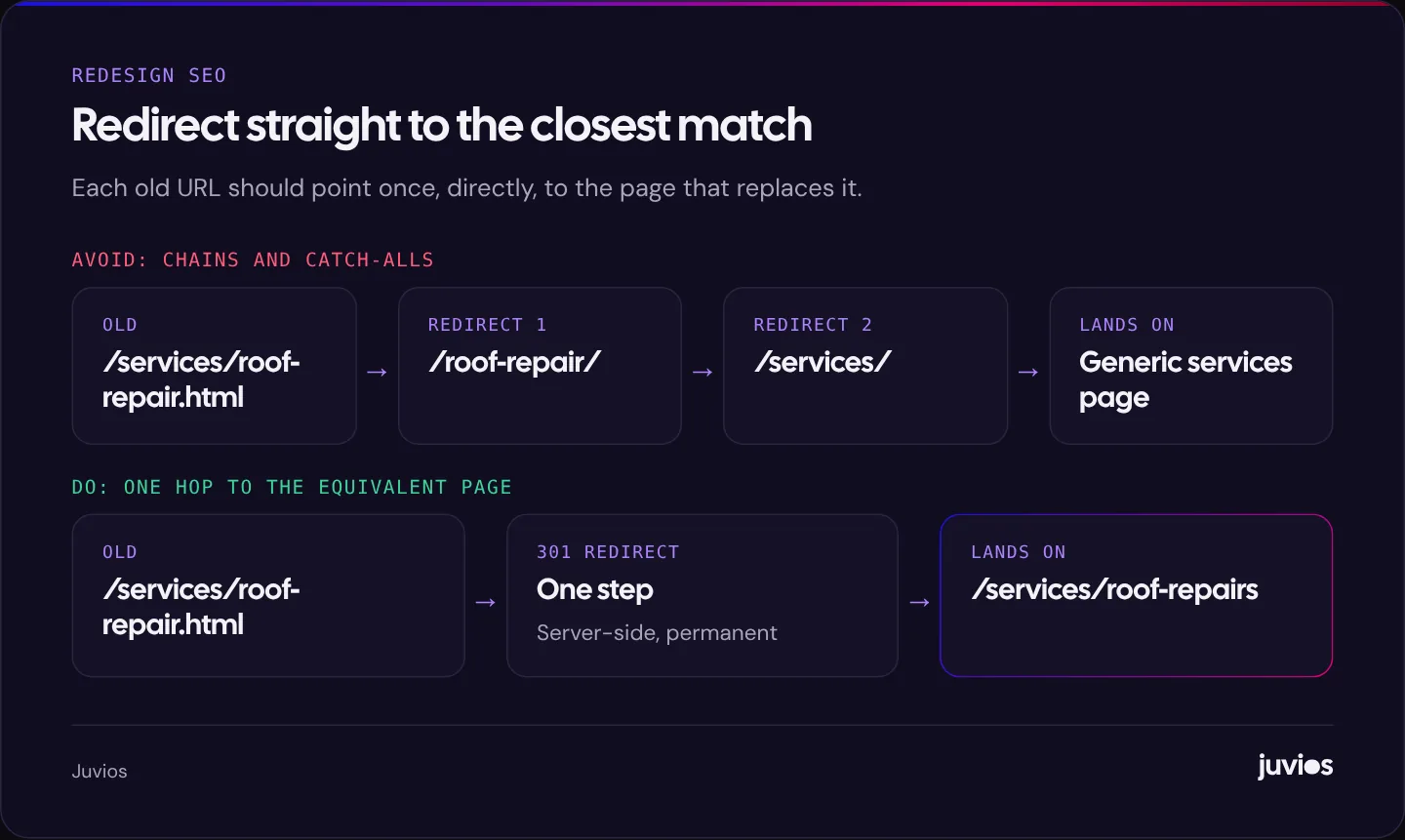
- Redirect to the closest equivalent page. Sending every old URL to the home page is tempting, but Google may treat irrelevant redirects like that as soft 404s, and visitors who followed a specific link land somewhere unhelpful.
- Avoid chains. If a page has moved more than once over the years, update old redirects so each one points straight to the final URL in a single hop.
- Use server-side redirects. Configure them on the server, in your CMS's redirect manager, or at your hosting or CDN level. JavaScript and meta refresh redirects are weaker and slower.
 Tap to enlarge
Launch day checklist
Launch at a quiet time for your business, with someone available to fix problems for at least a few days afterwards. Then work through this list.
- Remove the staging password or noindex tags, and check robots.txt isn't blocking the site.
- Switch on the redirect map, then test a sample of old URLs, including your top-traffic pages and pages with backlinks. Each should return a 301 and land on the right page in one step.
- Check that every important page has a self-referencing canonical tag and the title and description you intended.
- Submit the new XML sitemap in Search Console. Keeping the old sitemap available for a while can help Google discover the redirects faster.
- Use the URL Inspection tool on a few key pages to confirm Google can fetch and render them.
- Test your forms, phone links and analytics. Tracking often breaks in a redesign, and our guide to conversion tracking covers what to check.
- If the domain itself is changing, use the Change of Address tool in Search Console.
After launch: what to watch and when
Some movement in rankings after a redesign is normal while Google recrawls the site and processes the redirects. What you're looking for is anything that doesn't settle, or that points to a specific error.
The first week
Check Search Console daily for crawl errors and new 404s, and fix any missing redirects you find. Watch the server logs or your redirect manager's hit report to see which old URLs are still being requested. Review analytics to confirm that enquiries are being recorded.
The first month
Watch the Page indexing report as Google recrawls. New pages should move into the indexed group and old URLs should show as redirected. If important pages sit in “Crawled – currently not indexed” for weeks, our guide to why Google isn't indexing your pages explains what that status means and what to do.
The first quarter
Compare organic clicks, rankings for your key queries, and organic enquiries with the benchmark you took before launch. For many well-planned redesigns, traffic recovers within weeks. If a particular group of pages has lost visibility, compare the old and new versions side by side: content, titles, internal links and speed. The cause is usually visible.
Keep the old crawl and the redirect map after launch. They're the quickest way to answer questions months later, such as where an old page went or why a link from another site now lands where it does.
Mistakes we see most often
Most of the ranking losses we're asked to investigate after a redesign come from a short list of mistakes. None of them is exotic, and all of them are easy to check for.
The staging block went live
Developers block search engines on staging sites, rightly. Then the site launches with the block still in place: a sitewide noindex tag, a robots.txt file that disallows everything, or the WordPress setting that discourages search engines left ticked. Rankings start to fall within days. It's the single most damaging mistake and the quickest to check.
Redirects were written from memory
Someone writes redirects for the main menu pages and forgets the rest: old blog posts, landing pages from past campaigns, PDF downloads, image URLs that other sites link to. A crawl of the old site, combined with Search Console and analytics data, is the only reliable way to catch them all.
Content was simplified away
A redesign often aims for less text and more white space. That can work well, but pages that ranked because they answered questions in depth lose that ability when the answers are removed. Keep the substance, even if you restructure it with tabs, accordions or better headings. Content inside accordions is still crawlable when it's in the page's HTML.
Analytics broke on launch day
If tracking stops working when the new site goes live, you can't tell whether a dip in enquiries is real or just missing data. Check that analytics, conversion tags and form tracking fire on the new templates before you switch over, and again on launch day.
Everything changed at once
New domain, new URLs, new design, new content and a new platform in a single launch makes it very hard to know what caused any drop. If you can, separate the risky changes, for example by keeping URLs the same while you change the design, or by moving domain separately from the redesign.
Special cases
Changing platform
Moving from one CMS to another, or from WordPress to Shopify, almost always changes URL patterns. Shopify, for example, uses fixed paths such as /products/ and /collections/. Plan the redirect map early, because the new platform's rules may dictate the new URLs. If you're still choosing, see Shopify vs WooCommerce and WordPress vs custom.
Changing domain
A domain change adds another layer: every URL changes, so every URL needs a redirect, and you should verify both domains in Search Console and use the Change of Address tool. Expect a longer settling period than for a redesign on the same domain.
Merging sites
If you're combining two websites, for example after a merger or a rebrand, treat each old site's pages like any other move. Map them to the closest equivalent on the combined site, and avoid sending large numbers of pages to one generic page.
The short version
Record everything before you design. Keep URLs wherever you can. Map every URL that changes to its closest equivalent with a single server-side 301 redirect. Carry over the content that ranks. Remove staging blocks at launch, submit your sitemap, test redirects and tracking, and watch Search Console closely for the first few months. Pair this with our general website redesign checklist for the design and content side of the project, and if you'd like a second pair of eyes on your plan, book a free consultation.
Common questions
01Will I lose rankings if I redesign my website?
Not if it's planned well. Some short-term fluctuation is normal while Google recrawls the site, but keeping URLs, redirecting changed ones properly and preserving the content that ranks protects most sites from lasting losses.
02How long should I keep 301 redirects?
Google recommends keeping them as long as possible, generally at least a year. We recommend keeping them indefinitely, since they cost almost nothing and old links can keep sending visitors for years.
03Should I redirect deleted pages to the home page?
Only if the home page is genuinely the best replacement. Redirect to the closest relevant page instead. If there's no equivalent and the page has no links or traffic, it's fine to let it return a 404.
Sources
- Site moves with URL changes Google Search Central
- Redirects and Google Search Google Search Central
- Page indexing report Search Console Help
- Change of Address tool Search Console Help