On this page · 13 sections
Most small businesses that commission a website hit the same fork early on. Do you build on WordPress, the platform behind a large share of the web, or do you pay for a custom site written specifically for you? Both camps have loud advocates, and plenty of the advice online comes from people who only sell one of them. This guide sets out what each option really means for cost, speed, security, editing and long-term ownership, and gives you a simple way to decide which one your business needs.
What we mean by WordPress and custom
WordPress is an open-source content management system. You install it on web hosting, choose or commission a theme that controls the design, and add plugins for extra features such as forms, SEO settings or online booking. According to W3Techs, WordPress was used by 39.6% of all websites in October 2026, and by 58.3% of sites whose content management system it could identify. That scale is the main reason it's so easy to find themes, plugins, hosting and people who know it.
A custom website is one where developers write the front end, and often the back end, for your project. Today that usually means a modern JavaScript framework such as Next.js, sometimes paired with a "headless" CMS that gives your team an editing screen while the developers control how pages are built and delivered. It can also mean a bespoke application with no off-the-shelf CMS at all.
There's a large middle ground. A WordPress site with a theme designed and coded from scratch is technically WordPress, but it shares many traits with a custom build. And a custom site can use an off-the-shelf CMS for content. So the real question is less about labels and more about how much of your site is assembled from existing parts and how much is made for you.
Cost: upfront and over time
WordPress usually costs less to launch because so much already exists. A designer can start from a solid theme, a developer can install a proven forms plugin rather than write one, and hosting is widely available. For a content-led site with standard features, that can cut the build time substantially compared with writing everything from scratch.
Custom builds cost more upfront because every template, component and editing feature has to be built. The cost gap narrows, or reverses, when a site needs functionality that WordPress plugins handle badly. Bending a stack of plugins into a complex quoting tool or customer portal can end up costing more than building it properly, and it is harder to maintain afterwards.
Running costs differ in character rather than always in size. WordPress sites tend to carry several yearly licences for premium plugins and themes, plus maintenance time for updates. Custom sites have fewer licences but every change, from a new page layout to a new feature, needs a developer unless a good CMS is part of the build. For a fuller breakdown of build and running costs, see how much a small business website costs.
Editing the site yourself
For many owners, this is the deciding factor. WordPress was built as a publishing tool, and its block editor lets non-technical people write posts, update pages and swap images. The catch is that the more freedom the editor allows, the easier it is to break a carefully designed layout. A good build restricts the editor to approved blocks and patterns so your team can make changes without wrecking the design.
Custom sites can be just as easy to edit, but only if editing is designed in. If a developer builds a site with content hard-coded into templates, every typo becomes a support ticket. When you're comparing quotes for custom work, ask to see the editing interface, not just the front end, and ask exactly which parts of the site your team will be able to change.
Speed and Core Web Vitals
Custom builds have a natural advantage on speed because developers ship only the code each page needs. But plenty of custom sites are slow, and plenty of WordPress sites are fast. The difference comes from decisions, not the platform: how heavy the theme is, how many plugins load scripts on every page, how images are handled, and how good the hosting is.
WordPress speed problems usually trace back to multipurpose themes and page builders that load large amounts of CSS and JavaScript everywhere, plus plugins that each add their own files. A lean theme, a short plugin list, image optimisation and caching solve most of it. We cover the specific fixes in how to improve Core Web Vitals.
Security and maintenance
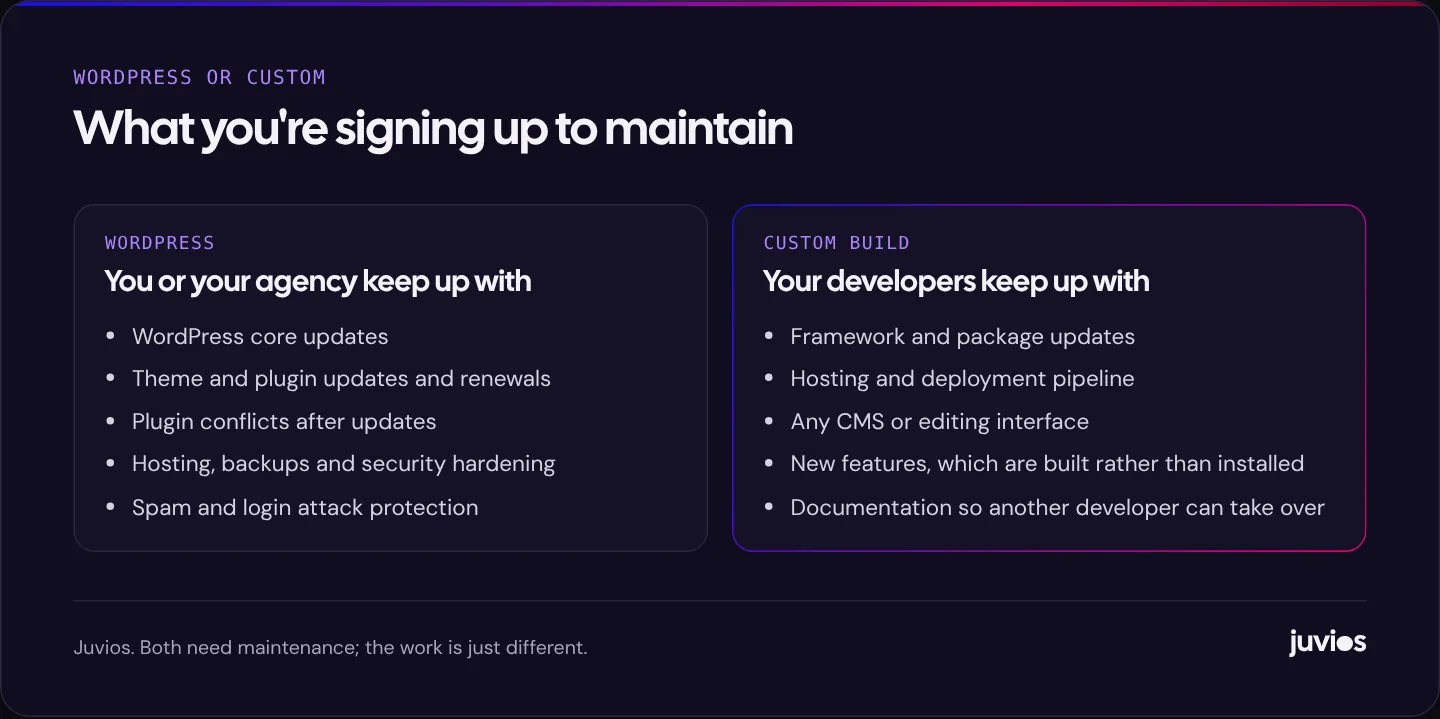
WordPress's popularity cuts both ways. Because so many sites run it, attackers write automated tools that probe WordPress sites for weak passwords and outdated plugins. In our experience most of the risk sits in what's added to WordPress rather than WordPress itself: a plugin or theme that wasn't updated, or an admin account with a weak password.
That risk is very manageable. Keep core, themes and plugins updated; remove anything you don't use; use strong passwords and two-factor authentication for admins; take regular off-site backups; and choose hosting that patches the server. The point is that someone has to do this every month. A WordPress site that's built and then left alone for two years is a liability.
Custom sites present a smaller target for automated attacks simply because they're unique, and a statically generated front end has very little to attack. They still need their frameworks and packages updated, and any custom login or form handling needs to be written with security in mind. Neither option is maintenance-free.
 Tap to enlarge
SEO: does the platform matter?
Search engines don't rank WordPress sites above or below custom ones. They rank pages. What matters is whether pages load quickly, can be crawled and rendered, have clear titles and headings, answer the searcher's question and earn links and mentions. Both platforms can do all of that well, and both can do it badly.
WordPress makes the basics easy with well-known SEO plugins that handle titles, descriptions, sitemaps and canonical tags. Custom sites need those features built in, which a good developer will do as a matter of course. One thing to check on custom JavaScript sites is that content is rendered on the server, or pre-rendered, so it's in the HTML that search engines receive, rather than appearing only after scripts run in the browser.
The bigger SEO risk is changing platforms. Moving from WordPress to custom, or the other way round, often changes URLs, and without careful redirects you can lose rankings you spent years earning. Our guide on redesigning a website without losing Google rankings walks through the process.
What about Webflow and website builders?
WordPress and custom code aren't the only choices. Hosted platforms such as Webflow, Squarespace and Wix sit between the two. You don't manage servers or software updates, because the platform does, and the design tools are often more visual than WordPress's. In exchange you pay a monthly subscription, accept the platform's limits, and can't simply move the site to another host if you leave.
Webflow in particular is a strong option for marketing sites where design quality matters and the team wants to edit content without risk to the layout. It gives designers fine control and produces clean, fast pages. It's less suited to sites that need deep custom functionality or a large plugin ecosystem. Simpler builders are fine for small brochure sites, especially if you'll build and edit the site yourself.
The same test applies: what does the site have to do, who will edit it, and who will look after it? If a hosted builder answers those questions well, it can be cheaper and calmer to run than either WordPress or a custom build.
Mistakes we see on both sides
The platform is rarely the reason a website disappoints. The decisions made on top of it usually are. These are the patterns we see most often when we're asked to rescue a site.
WordPress sites that grew by accident
A site starts lean, then every new need is met with another plugin: a slider, a popup, a second forms plugin because the first one didn't do one thing, an all-in-one marketing suite that's only half used. Three years later there are forty plugins, nobody remembers what half of them do, and updating one breaks another. The fix is a plugin audit: remove what isn't used, replace overlapping tools with one good one, and write down what each remaining plugin is for.
Page builders used for everything
Visual page builders make it easy to create layouts without code, which is why they're popular. They also tend to load large amounts of code on every page and make it easy for editors to drift away from the design. Used for a few landing pages, they're fine. Used as the foundation of a whole site, they often become the main cause of slow pages and inconsistent design.
Custom sites nobody else can maintain
The custom equivalent is a site built quickly by one developer with no documentation, unusual tooling and content baked into the code. It works until that developer moves on. Before commissioning custom work, ask how the code will be documented, where it will be hosted, who will own the repository, and how another developer would pick it up.
Choosing on looks alone
Both platforms can produce beautiful sites. Choosing a supplier because their portfolio looks good, without asking how they build, host and maintain, is how businesses end up with a lovely site that's slow, hard to edit or expensive to change.
Side by side
| WordPress | Custom build | |
|---|---|---|
| Upfront cost | Usually lower, because themes and plugins already exist | Usually higher, because templates and features are built for you |
| Time to launch | Faster for standard content sites | Slower; depends on scope |
| Editing | Familiar editor; needs guard rails to protect the design | As easy as the CMS that's built in; check before you buy |
| Speed | Can be fast with a lean theme and few plugins | Can be very fast; not automatic |
| Security | Needs regular updates; common target for automated attacks | Smaller target; still needs updates and secure code |
| Unusual features | Plugins cover a lot, but complex needs get messy | Built to fit, so complex features are cleaner |
| Finding help | Huge pool of developers and agencies | Depends on the stack; documentation matters |
| Lock-in | Low; many providers can take it over | Higher unless the code is documented and you own it |
How to decide
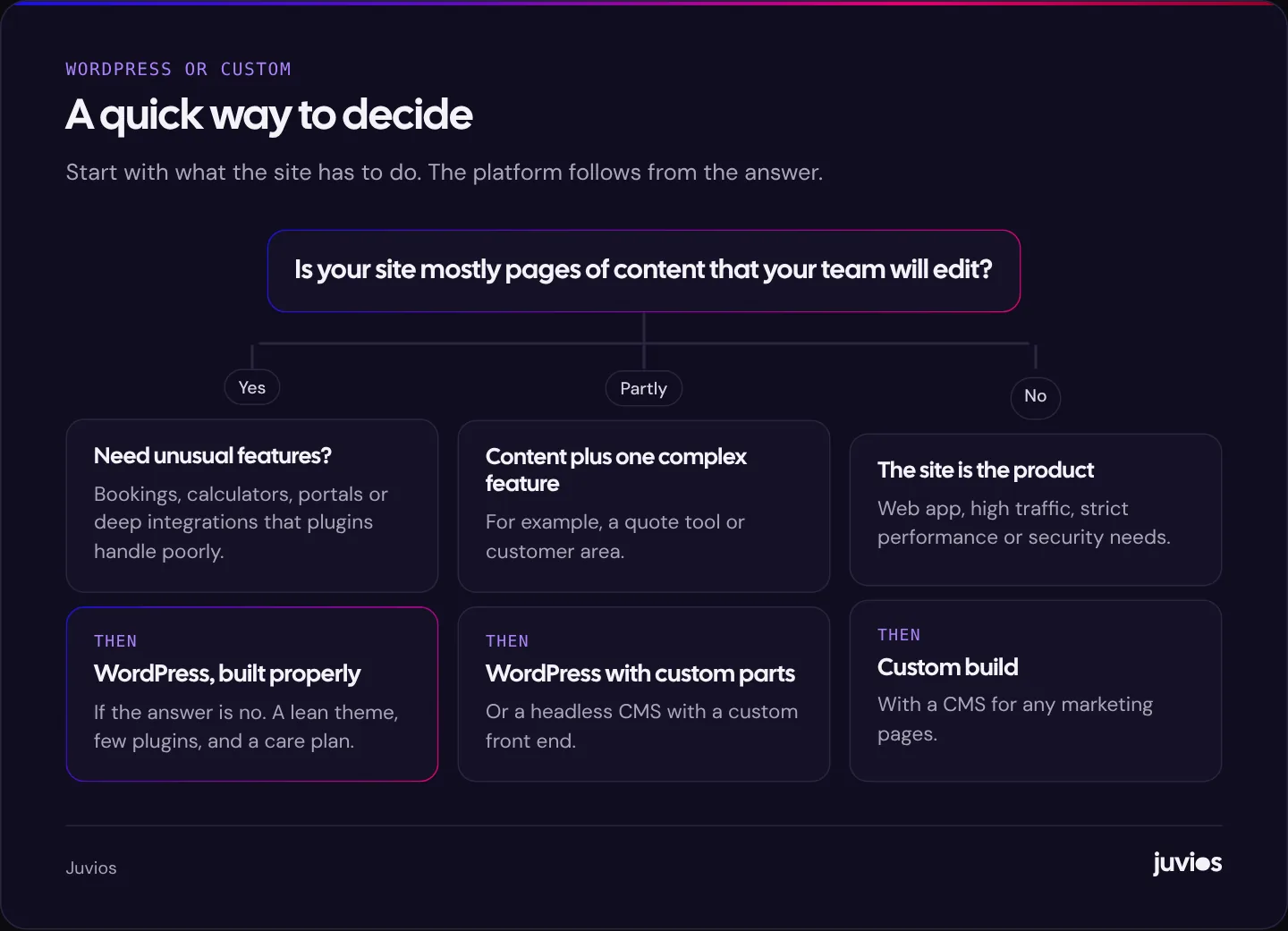
Start with the job the website has to do. If it's mainly pages of content that your team will update, such as services, locations, case studies and articles, WordPress built carefully is usually the sensible choice. If the site is the product, or needs complex features, very high performance or tight security, a custom build earns its cost.
 Tap to enlarge
Choose WordPress if
- Your site is mostly marketing pages and articles.
- Your team wants to publish and edit without a developer.
- Your budget is moderate and you'd rather spend on content than code.
- You want the freedom to switch agencies easily later.
Choose a custom build if
- You need features that would take a tangle of plugins to fake.
- Performance is central, for example a high-traffic site where every fraction of a second counts.
- You have, or will pay for, ongoing developer support.
- Your brand or product needs an experience a theme can't deliver.
If you sell online, the choice is usually different again: a hosted platform or an open-source store. We compare the two main options in Shopify vs WooCommerce for a growing store.
How we approach it at Juvios
We build on WordPress, Webflow, Shopify and modern frameworks such as Next.js, and we pick the platform per project. We'd rather explain why a platform suits your business than talk you into the one we prefer to build on. For most small and mid-sized businesses whose website is a marketing tool, that means a mainstream CMS, kept lean. For projects where the website is part of the product, it means custom code with an editing experience your team can actually use.
Whichever way you go, make sure you own the domain, the hosting account and the content, and that the site is documented well enough for someone else to look after it. If you'd like help weighing up the options, book a free consultation.
Common questions
01Is WordPress good enough for a professional business website?
Yes. Many professional and very large organisations run WordPress. The quality depends on how it's built and maintained, not on the platform itself.
02Are custom websites better for SEO?
Not inherently. Search engines rank pages on relevance, quality and experience. A custom site can be faster, but a well-built WordPress site can rank just as well.
03Can I move from WordPress to a custom site later?
Yes, but plan it as a migration: keep URLs where you can, redirect the ones that change, and move content carefully so you don't lose rankings.
Sources
- Usage statistics and market share of WordPress (21 October 2026) W3Techs
- Understanding Core Web Vitals and Google search results Google Search Central
- Hardening WordPress WordPress.org Developer Resources
- Understand JavaScript SEO basics Google Search Central