On this page · 15 sections
If you advertise on Facebook or Instagram, Meta needs to know what happens after someone clicks your ad. Did they enquire? Book? Buy? That information comes from two tools that are often confused: the Meta Pixel, which runs in the visitor's browser, and the Conversions API, which sends events from your server. Meta recommends using both together. This guide explains what each does, why one alone isn't enough, how Meta avoids counting the same lead twice, and how to set it up on a typical small business website or store.
Why tracking decides how your Meta ads perform
Meta's ad delivery system learns from the conversions you send it. When you run a campaign optimised for leads or purchases, Meta looks at the people who converted and finds more people like them. If conversions are missing, it learns from fewer examples. If the wrong action is counted, such as a page view instead of a submitted form, it learns to find the wrong people.
The data also drives your reporting. Without reliable conversion tracking you can't tell which ads, audiences or placements pay for themselves, and budget decisions become guesswork. That's why we set up and test tracking before any budget is spent on a client's Meta campaigns.
What the Meta Pixel does
The Meta Pixel is a piece of JavaScript code on your website. When a visitor takes an action, such as viewing a page, submitting a form or completing a purchase, the Pixel sends an event to Meta from the visitor's browser. Meta uses those events to attribute conversions to ads, build audiences such as people who visited your pricing page, and optimise delivery.
The Pixel is easy to install and works well, but because it runs in the browser it depends on the browser letting it run. Ad blockers can stop it. Browser privacy features can limit the cookies and identifiers it relies on. If a visitor declines advertising cookies, your consent set-up should stop it firing. And if the page closes before the event is sent, for example a fast redirect after a form submission, the event can be lost.
What the Conversions API does
The Conversions API sends the same kinds of events directly from your server, your e-commerce platform or your CRM to Meta. Because the event doesn't depend on code running in the visitor's browser, it isn't stopped by ad blockers or lost when a page closes early. It still has to respect the visitor's consent choices, which is your responsibility to implement.
Server events can also include customer information, such as an email address or phone number from a form, which is hashed before it's sent. Meta uses that to match the event to a Meta account more reliably. The Conversions API can send events the browser never sees, too, such as a lead becoming a customer in your CRM days after the enquiry.
How Meta avoids counting the same lead twice
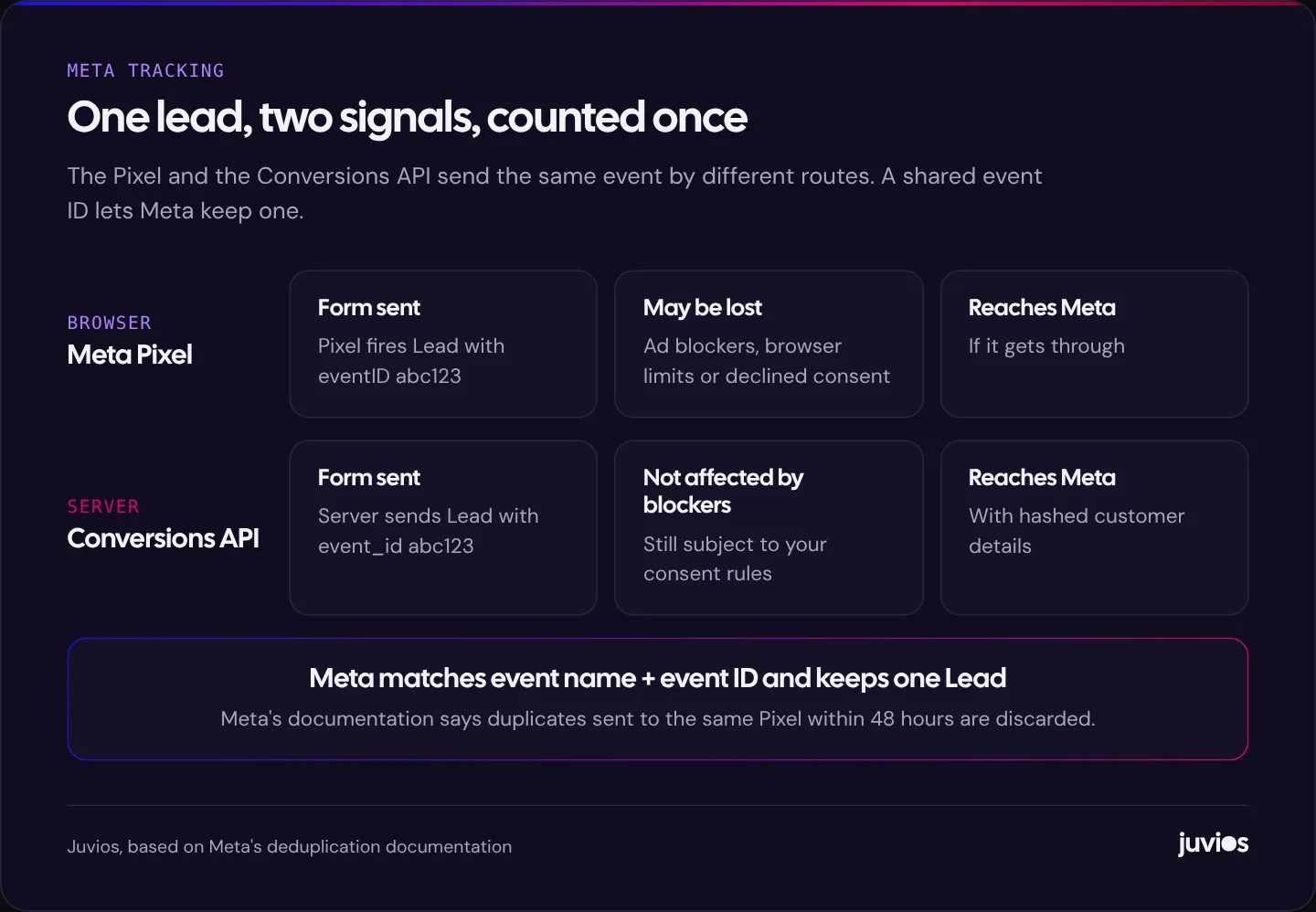
If the Pixel and the Conversions API both send a Lead event for the same form submission, Meta needs to know they're the same lead. This is called deduplication, and it's the part of the set-up most often done wrong.
Meta's deduplication guide recommends matching on two fields. The browser event's eventID must match the server event's event_id, and the browser event name must match the server event_name. When Meta receives a browser event and a server event with the same name and ID for the same Pixel within 48 hours, it keeps one and discards the duplicate.
 Tap to enlarge
In practice, your website generates a unique ID for each event, such as each form submission, and passes it to both the Pixel call and the server call. Platform integrations usually handle this for you. Custom set-ups need a developer to make sure both sides use the same ID. If they don't, you'll see conversions roughly doubled in Ads Manager, which flatters results and confuses bidding.
Which events to send
Meta has a set of standard event names that its systems understand. Use them where they fit rather than inventing your own, and map each one to a real action on your site.
| Business type | Action on your site | Standard event |
|---|---|---|
| Lead generation | Enquiry form submitted | Lead |
| Lead generation | Consultation or appointment booked | Schedule |
| Lead generation | Phone, WhatsApp or email link clicked | Contact |
| Lead generation | Account or sign-up completed | CompleteRegistration |
| E-commerce | Product page viewed | ViewContent |
| E-commerce | Item added to cart | AddToCart |
| E-commerce | Checkout started | InitiateCheckout |
| E-commerce | Order completed, with value and currency | Purchase |
For lead generation, the Lead event on a successful submission is usually the main optimisation event. Fire it when the form actually succeeds, not when the button is clicked. If you later learn which leads became customers, you can send that outcome through the Conversions API too, which helps Meta favour the people who buy rather than everyone who fills in a form.
Setting it up
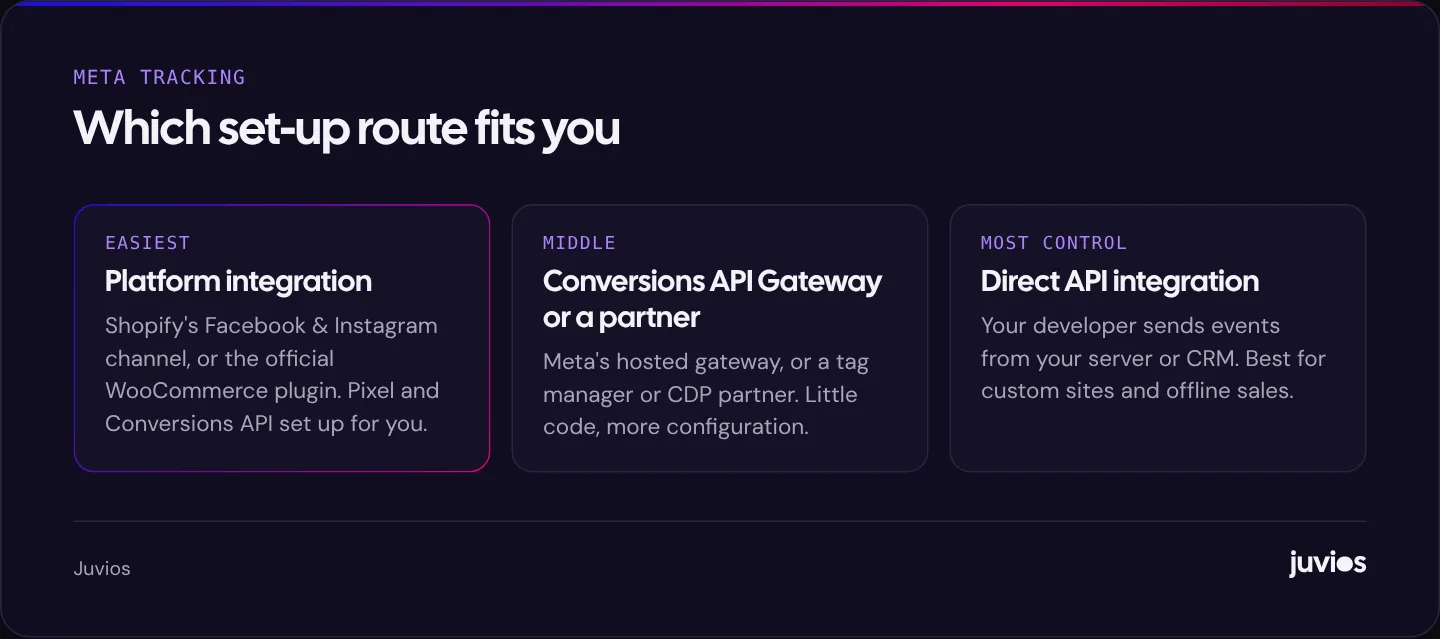
There are three main routes. The right one depends on your platform and how much control you need.
 Tap to enlarge
Platform integrations
If you're on Shopify, the Facebook and Instagram sales channel sets up the Pixel and Conversions API together. WooCommerce has an official Meta integration plugin. Many other platforms and form tools have similar connections. These handle event IDs and deduplication for standard events, which removes the most common source of errors. If you're still choosing a platform, our Shopify vs WooCommerce comparison covers how each handles tracking.
Conversions API Gateway and partners
Meta offers a Conversions API Gateway that runs on your own cloud account and mirrors your Pixel events to the server, and a range of partner integrations through tag management and customer data platforms. These suit custom websites where you don't want to write code against the API directly.
Direct integration
A developer can send events from your server or CRM using the API. This gives the most control and is the way to send offline events, such as a lead marked as won in your CRM. It's also the most work to build and maintain.
The checklist
- Install the Pixel and confirm it's linked to the right ad account in Events Manager.
- Choose your main events and fire them on successful actions only.
- Add the Conversions API through your platform, a gateway or a direct integration.
- Make sure each event has the same event name and event ID in both the browser and server versions.
- Send customer information, hashed, with server events where you have consent to do so.
- Connect your consent banner so the Pixel and server events respect visitors' choices.
- Test with Events Manager's Test Events tool, then check the deduplication and event match quality diagnostics.
Checking it works
Events Manager is where you confirm everything is healthy. The Test Events tab shows events arriving in real time as you submit forms or place test orders. The overview for each event shows whether it's being received from the browser, the server, or both, and whether duplicates are being removed. Meta also shows an event match quality score that reflects how well your server events can be matched to accounts; sending more customer details, with consent, usually improves it.
Then compare with reality. If Ads Manager reports far more leads than you received, look for duplicates. If it reports far fewer, look for events that aren't firing, consent settings that block too much, or forms that redirect before the Pixel can send.
Lead ads and instant forms
Not every Meta lead comes through your website. Lead ads let people submit an instant form inside Facebook or Instagram without leaving the app, which often produces more leads at a lower cost per lead, and sometimes lower quality, because submitting is so easy.
Because the form lives on Meta, the Pixel never sees these submissions. Meta records the lead itself, but it doesn't know what happens next unless you tell it. Connecting your CRM so that leads from instant forms flow in automatically, and then sending back what happened to each one, such as contacted, qualified or won, through the Conversions API, lets Meta optimise towards leads that turn into business rather than leads that simply submit.
If your team calls every lead within minutes and qualifies them carefully, lead ads can work very well. If leads sit in a spreadsheet for days, the quality problem will look like a Meta problem when it's really a follow-up problem. Our guide to why your website isn't generating leads covers follow-up in more detail, and the same principles apply here.
Sending offline and CRM events
For service businesses, the most valuable data often arrives days or weeks after the click: a quote accepted, a contract signed, a booking attended. The Conversions API can carry those events too, as long as you can link the outcome back to the original lead, usually through the hashed email address or phone number, and the click identifier where you've captured it.
The simplest version is a CRM integration that sends an event when a lead moves to a particular stage. Many popular CRMs offer this directly or through partner tools. A custom version is a small piece of server code that sends an event to the API when your system records a sale. Either way, start with one outcome that matters, such as "qualified lead" or "customer", rather than trying to send every stage at once.
What to expect after you add the Conversions API
Once deduplication is working, you'll typically see more conversions attributed in Ads Manager than with the Pixel alone, because events the browser missed are now recorded. That's not inflation; it's recovered data. Keep an eye on the ratio between reported leads and the leads you actually receive. If they move apart sharply, check for duplicates.
Campaign performance may shift as Meta's delivery system learns from the more complete data. Avoid judging changes in the first few days, and avoid making several big changes to campaigns at the same time as you change tracking, or you won't know which one made the difference.
Privacy and consent
Sending visitor data to an advertising platform has legal implications that vary by country. In the UK and EEA, for example, you generally need consent before setting advertising cookies or sharing personal data for advertising. This isn't legal advice, but the practical points are consistent: explain your tracking in your privacy policy, use a consent tool that actually controls the Pixel and server events, hash customer details before sending them, and only send what you need.
Server-side tracking isn't a way around consent. If a visitor declines advertising tracking, your server events for that visitor should respect that choice too.
Keeping tracking healthy
Tracking that worked at launch breaks quietly over time. A new form plugin, a theme update, a change of checkout app or a new consent banner can each stop events firing or create duplicates. Build a short monthly check into your routine: submit a test lead, place a test order if you sell online, and confirm both arrive in Events Manager with deduplication working.
Also check after any change of agency or platform. It's common to find two Pixels on a site, one from the old set-up and one from the new, or two integrations both sending server events. Remove whatever isn't needed so Meta receives one clean stream of events.
Common mistakes
- Pixel only, no Conversions API, so a share of conversions is lost to blockers and browser limits.
- Both installed without deduplication, so every lead is counted twice.
- Events firing on button clicks rather than successful submissions or completed orders.
- Two Pixels or two integrations left running after an agency or platform change.
- Purchase events without value or currency, so value-based optimisation can't work.
- Consent not connected, either blocking everything or nothing.
Once tracking is right, budget decisions become much easier; our guide to how much to spend on Facebook and Instagram ads covers that next step. For Google's equivalent, see Google Ads conversion tracking. And if you'd like us to check your set-up, book a free consultation.
Common questions
01Do I need both the Meta Pixel and the Conversions API?
Meta recommends using both. The Pixel captures browser activity and supports audiences; the Conversions API recovers events the browser misses and can send offline outcomes. Together, with deduplication, they give Meta the most complete picture.
02Will the Conversions API double my conversions?
Only if deduplication isn't set up. Send the same event name and event ID from both the browser and the server, and Meta keeps one.
03Is the Conversions API hard to set up?
On Shopify and WooCommerce, official integrations make it straightforward. Custom sites need a gateway, a partner tool or a developer.
Sources
- Deduplicate Pixel and Server Events Meta for Developers
- Conversions API Meta for Developers
- Meta Pixel Meta for Business
- Standard events reference Meta for Developers