On this page · 11 sections
You publish a page, wait a few weeks, and it never appears in Google. You open Search Console and find it listed under a status such as "Crawled – currently not indexed" or "Discovered – currently not indexed", with no explanation of what to do. It's one of the most common SEO questions small businesses ask, and the answers online range from sensible to superstitious. This guide explains what each status actually means, how to find the cause for your pages, and which fixes are worth your time.
How a page gets into Google
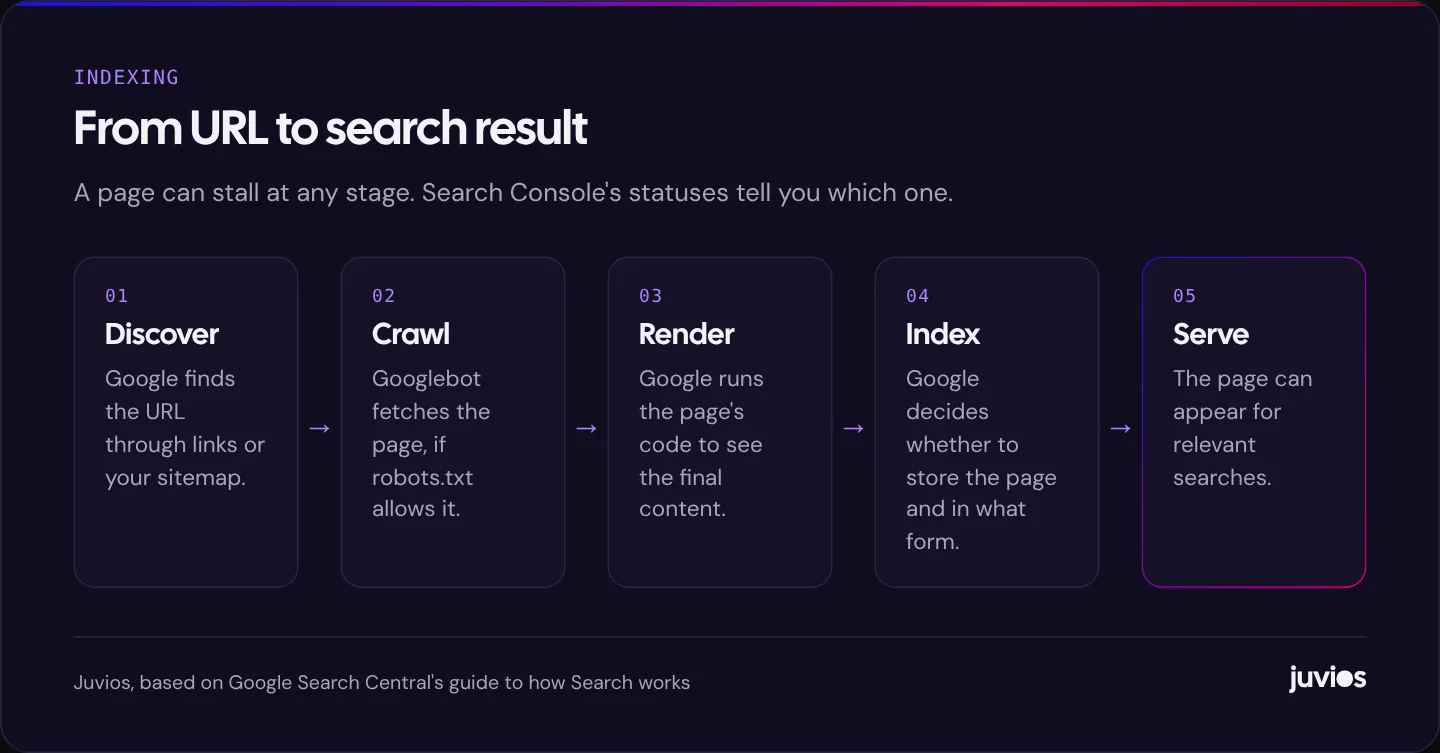
Google describes the process in its guide to how Search works. In short, Google discovers URLs, crawls them by fetching the page, renders the page by running its code as a browser would, and then decides whether to add the page to its index. Only indexed pages can appear in search results.
The part people often miss is that indexing is a decision, not an automatic reward for publishing. Google doesn't index every page it crawls. It chooses, based on whether the page seems useful, whether it duplicates something else, and how much it's worth crawling and storing from your site. So a page that isn't indexed isn't necessarily broken. It may simply not have convinced Google yet.
 Tap to enlarge
Find out exactly what Google thinks
Start in Google Search Console. If you haven't set it up, do that first: you can't diagnose indexing without it.
The Page indexing report
Under Indexing, open Pages. The Page indexing report groups your URLs into indexed and not indexed, and lists the reasons pages aren't indexed. Click into each reason to see example URLs. Focus on the pages you care about. A list of thousands of unindexed tag archives or filtered product URLs is often fine; one unindexed service page is not.
URL Inspection
For a specific page, paste its URL into the inspection bar at the top of Search Console. You'll see whether it's indexed, how Google discovered it, when it was last crawled, whether crawling was allowed, which canonical Google selected, and whether the page is mobile-friendly enough to render. The live test shows how Google sees the page right now, including a screenshot of the rendered result.
What the main statuses mean
Search Console uses precise language, and each status points to a different stage of the process. These are the ones small business sites see most.
| Status | What it means | First thing to check |
|---|---|---|
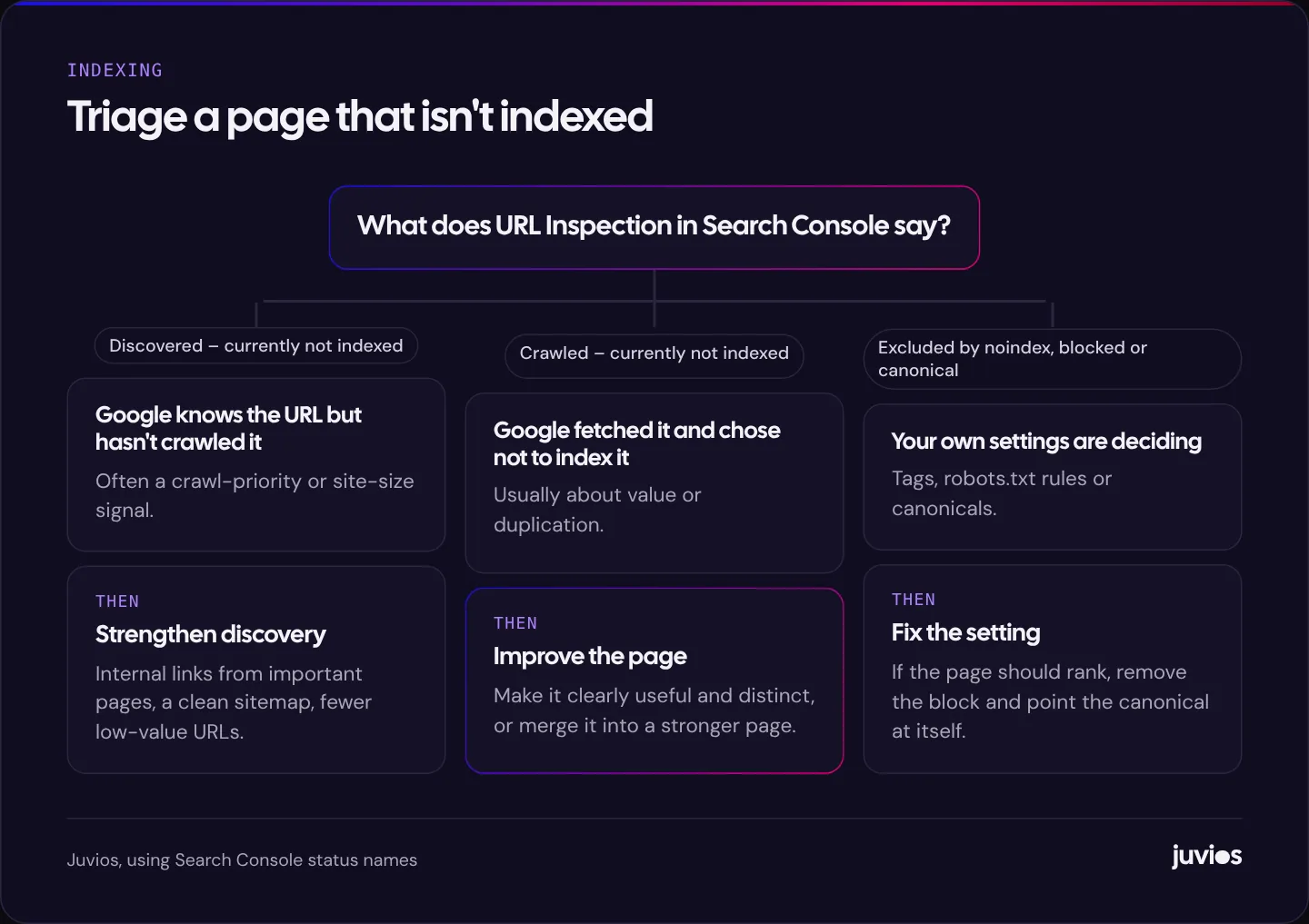
| Discovered – currently not indexed | Google knows the URL exists but hasn't crawled it yet and has rescheduled the crawl. | Is the page linked from important pages? Is the site generating lots of low-value URLs? |
| Crawled – currently not indexed | Google crawled the page but chose not to index it for now. It may be indexed later. | Is the page clearly useful and distinct from other pages on your site and elsewhere? |
| Excluded by 'noindex' tag | The page tells search engines not to index it. | Was the tag left over from staging, or added by a plugin setting? |
| Blocked by robots.txt | Your robots.txt file stops Google crawling the URL. | Should this URL be crawlable? Check the rule that matches it. |
| Alternate page with proper canonical tag | The page points to another URL as its canonical, and Google respects that. | Usually fine. Confirm the canonical is the version you want to rank. |
| Duplicate, Google chose different canonical than user | You said one URL is canonical, but Google picked another. | Are the pages too similar? Do internal links and sitemaps agree on one version? |
| Not found (404) | The URL returns a not-found error. | Should it redirect to a replacement page? |
| Soft 404 | The page returns OK but looks like an error or empty page to Google. | Does the page have real content? Is it an empty category or search result? |
| Page with redirect | The URL redirects elsewhere. | Normal for old URLs. Make sure sitemaps list final URLs only. |
Fixing "Crawled – currently not indexed"
This status means Google has seen the page and decided it's not worth indexing at the moment. That's a judgement about value, so the fixes are about making the page more clearly worth indexing, or about telling Google which page to prefer.
Is the page thin?
A service page with two sentences, a location page that's a copy of ten others with the town name swapped, or a blog post that restates what every other article says gives Google little reason to index it. Google's guidance on helpful, people-first content is the best reference here. Ask whether the page answers a real question better than the pages already ranking.
Is it a near-duplicate?
Many sites create pages that are almost identical: product variants with their own URLs, printer-friendly versions, tag and category archives that list the same posts, or location pages built from a template. If several of your pages say essentially the same thing, Google may index one and leave the rest. Either make each page genuinely distinct, or merge them into one stronger page and redirect the others.
Is the page important to your own site?
Internal links are one of the clearest signals you control. A page that's only reachable through the sitemap, or buried five clicks deep, looks unimportant. Link to it from relevant, well-visited pages with descriptive anchor text. On a small site, a link from the main navigation or a key service page makes a real difference.
Is the content visible to Google?
If important text appears only after a visitor clicks, scrolls a long way, or after JavaScript loads data from another server, check the rendered HTML in URL Inspection. Google can render JavaScript, but content that isn't in the rendered page can't be indexed. Google's JavaScript SEO basics explain what to watch for.
 Tap to enlarge
Fixing "Discovered – currently not indexed"
Here Google knows the URL exists but hasn't got round to crawling it. On a small site with a few hundred pages, this is usually temporary for new pages. If it persists, it suggests Google doesn't see much reason to prioritise crawling them.
- Link to the page from important pages. As above, internal links tell Google a page matters.
- Keep your sitemap clean. List only the canonical, indexable URLs you want in search, with accurate last-modified dates. A sitemap full of redirects, 404s and noindexed pages weakens its usefulness as a signal.
- Reduce low-value URLs. Faceted navigation, internal search results, calendar pages and session parameters can create thousands of URLs that compete for crawling. Block or consolidate the ones that shouldn't be in search.
- Check server health. If your server is slow or returns errors when Googlebot visits, Google crawls less. The Crawl stats report in Search Console's settings shows response times and errors.
For larger sites, Google publishes a guide to managing crawl budget. Google says most sites don't need to worry about crawl budget, and that the guide is mainly for very large or frequently updated sites, so treat it as background rather than a to-do list for a small business site.
When your own settings are the problem
Some exclusions are self-inflicted, and they're the fastest to fix once you find them.
Leftover noindex tags
A noindex tag tells search engines not to index the page. It's often added deliberately to staging sites, thank-you pages or internal pages, and sometimes left on by mistake after a redesign or plugin change. In WordPress, check the Reading settings for the option that discourages search engines, and check your SEO plugin's settings for individual pages and whole post types.
Robots.txt rules that are too broad
Robots.txt controls crawling, not indexing, and a rule written to block one folder can easily block more than intended. If a page is blocked by robots.txt, Google can't see a noindex tag on it either, so blocking is the wrong tool for removing pages from search. Use noindex for that, and let Google crawl the page so it can see the tag.
Canonical tags pointing elsewhere
A canonical tag says which URL is the main version of a page. If a template sets every page's canonical to the home page, or points product variants at a URL that doesn't exist, Google may ignore the pages you want indexed. Each indexable page should usually have a canonical pointing to itself.
Three situations we see often
A brand-new website
A new domain has no history and few, if any, links from other sites. Google will usually index the home page and a handful of key pages fairly quickly, then take longer over the rest. Submit a sitemap, make sure every important page is linked from the navigation or from other pages, and get the business listed in a few reputable places such as your Google Business Profile and relevant industry directories. Then be patient for a few weeks before assuming something is wrong.
Location pages built from a template
Many service businesses create a page for every town they serve, with the same text and the town name swapped. These are often crawled and then left out of the index, because Google sees them as near-duplicates. If you want location pages to be indexed, give each one something genuinely local: the services you actually offer there, the areas within it you cover, relevant photos of work done there, local reviews, travel times or practical details. If you can't say anything distinct about a location, a single service-area page is often the better choice.
Online shops with filters and variants
Stores can generate enormous numbers of URLs from filters (colour, size, price), sorting options and product variants. Most of these shouldn't be indexed. Make sure filtered and sorted views either use canonical tags pointing to the main category, are kept out of the sitemap, or are blocked from crawling where appropriate, and that each product has one canonical URL. That leaves Google's attention for the category and product pages that should rank.
A simple process to follow
- List the pages that matter: services, locations, key articles and product categories.
- Inspect each one in Search Console and note its status.
- Fix any self-inflicted exclusions first: noindex, robots.txt and canonical errors.
- For crawled-but-not-indexed pages, improve, differentiate or merge them.
- For discovered-but-not-crawled pages, add internal links and tidy your sitemap.
- Request indexing once for each improved page, then give it a few weeks.
- Check the report monthly, and investigate any important page that drops out.
If a redesign or migration is behind a sudden rise in unindexed pages, check redirects and staging settings first; our guide to redesigning without losing rankings covers the usual suspects. Slow servers can also limit crawling, so if your Crawl stats show high response times, our Core Web Vitals guide is a useful next read.
Realistic expectations
Not every page on your site needs to be indexed, and a healthy site often has many unindexed URLs: redirects, filtered pages, paginated archives and the like. What matters is that the pages you want people to find are indexed, and that they deserve to be.
Be patient after fixing genuine problems. Google needs to recrawl the affected pages and reassess them, and on a small site that can take a few weeks. Use the validation option in the Page indexing report for a fixed issue, then let it run rather than requesting indexing repeatedly.
It also helps to keep a short list of your most important URLs and check them in Search Console every month, rather than reacting to the total count of unindexed pages, which rises and falls for many harmless reasons. If one of the pages on your list drops out of the index, you'll know quickly and can look at what changed.
Indexing is also only the first step. An indexed page still has to rank, which depends on how relevant and useful it is compared with the alternatives. For the foundations, see SEO basics for small businesses. And if you'd like a second opinion on your Search Console data, book a free consultation.
Common questions
01How long does it take Google to index a new page?
It varies from hours to weeks. Pages on established sites with good internal linking tend to be crawled sooner. If an important page isn't indexed after a few weeks, inspect it in Search Console.
02Should I keep clicking Request indexing?
No. Requesting once after you've improved a page is enough. Repeated requests without changes don't help.
03Is it bad to have lots of unindexed pages?
Not necessarily. Many URLs, such as redirects, filtered views and archives, shouldn't be indexed. Focus on whether the pages that matter to your business are indexed.
Sources
- In-depth guide to how Google Search works Google Search Central
- Page indexing report Search Console Help
- Creating helpful, reliable, people-first content Google Search Central
- Understand JavaScript SEO basics Google Search Central
- Managing crawl budget for large sites Google Search Central