
On this page · 12 sections
More people now ask an AI tool a question before, or instead of, scrolling through search results. Google shows AI Overviews and offers AI Mode, ChatGPT can search the web, and Microsoft's Copilot and Perplexity answer questions with links to their sources. For a business, the obvious question is how to be one of those sources. There's a lot of confident advice about this, much of it untested. This guide sticks to what the platforms themselves say, explains how these tools find pages, and sets out the work that actually improves your chances of being cited.
What's actually changed
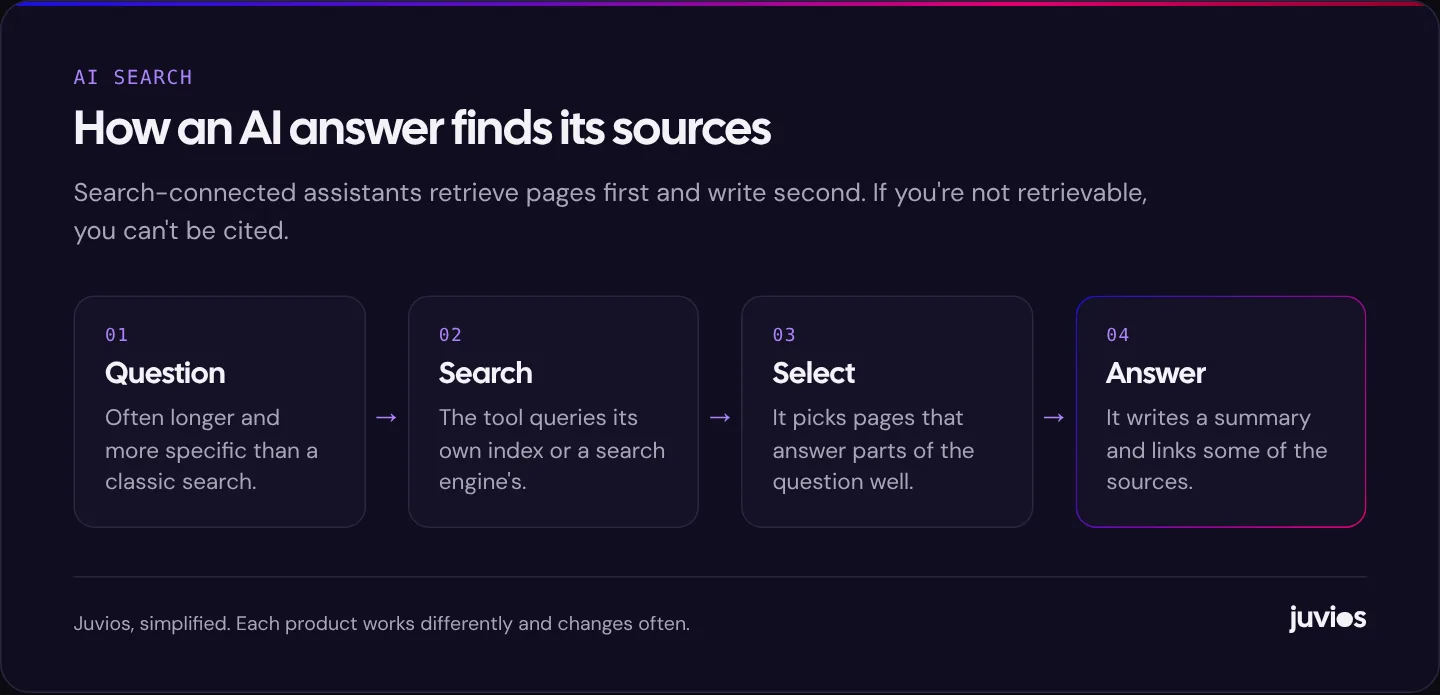
Traditional search gives you a list of links and lets you choose. AI search tools read several pages for you and write a summary, usually with some links back to the pages they used. The searcher gets an answer faster, and may never click through. When they do click, it's often to a page that the answer cited.
Two things follow for businesses. First, the questions are changing. People type or speak longer, more specific questions, such as "which accountant in Colombo handles company tax returns for small IT firms", because the tools handle them well. Second, being cited matters as much as ranking. If an AI answer mentions three providers and links to their pages, being one of the three is the new first page.
What hasn't changed is that these tools mostly rely on search. When a question needs current or specific information, they retrieve pages from an index, often a traditional search engine's, and base the answer on what they find. That's good news, because it means the foundations of being found in AI answers are largely the foundations of being found in search.
 Tap to enlarge
What Google says about AI Overviews and AI Mode
Google's documentation on AI features and your website is unusually direct. It says there are no additional requirements to appear in AI Overviews or AI Mode, and no special optimisations necessary. To be eligible to be shown as a supporting link, a page must be indexed and eligible to be shown in Google Search with a snippet. It also says you don't need to create new machine-readable files, AI text files or markup to appear in these features, and that there's no special schema.org structured data you need to add.
In other words, for Google, AI visibility is search visibility. The same ranking systems and the same quality signals apply. If your page is indexed, allowed to show a snippet and is among the most useful pages for a question, it can be used in an AI answer. If it isn't, no special trick will put it there.
Who's crawling your site, and what each crawler is for
Each AI company uses its own crawlers, and they do different jobs. Some fetch pages to build a search index; others collect content to train models; some fetch a page only when a user asks about it. Your robots.txt file controls most of them, and it's worth deciding deliberately which you allow.
| User agent | Operator | What it's used for |
|---|---|---|
| Googlebot | Google Search, including AI Overviews and AI Mode. Blocking it removes you from Google Search. | |
| Google-Extended | A control for Gemini model training and grounding. Google says it doesn't affect inclusion or ranking in Google Search. | |
| Bingbot | Microsoft | Bing's search index, which Microsoft's Copilot also draws on. |
| OAI-SearchBot | OpenAI | Surfacing sites in ChatGPT search results. OpenAI says sites that opt out won't be shown in ChatGPT search answers. |
| GPTBot | OpenAI | Collecting content that may be used to train OpenAI's models. Separate from search. |
| PerplexityBot | Perplexity | Indexing pages for Perplexity's answers. |
The practical decision for most businesses is simple. If you want to appear in AI search answers, allow the search crawlers: Googlebot, Bingbot, OAI-SearchBot and PerplexityBot. Whether you allow training crawlers such as GPTBot or the Google-Extended control is a separate question about whether your content can be used to train models, and it doesn't affect your visibility in Google Search. OpenAI's crawler documentation and Google's list of common crawlers explain the distinction.
Check whether your hosting, CDN or security plugin blocks AI crawlers by default. Some services added one-click blocking of "AI bots" that can include search crawlers as well as training ones. If you want to be cited, make sure the search crawlers can get through.
Content that gets cited
No one outside these companies knows exactly how each tool chooses sources, and the systems change constantly. But the pages that tend to be used share some obvious traits, and they're the same traits Google describes in its guidance on helpful, people-first content.
Answer specific questions specifically
AI answers stitch together parts of pages. A page that clearly answers a specific question, such as what a service costs, how long it takes, what's included or how two options compare, gives the tool something concrete to use. A page of general claims about quality and excellence gives it nothing. Write the way you'd answer a customer on the phone: direct, specific and complete.
Say things others don't
If your page says the same thing as fifty others, there's little reason to cite yours. Original material makes a page worth citing: your own process, real pricing ranges where you can share them, specific local knowledge, comparisons based on your experience, or data you've collected yourself. Be careful to keep it accurate. AI tools can repeat errors widely, and you don't want your business to be the source of one.
Make the structure obvious
Clear headings, short paragraphs that each make one point, tables for comparisons and lists for steps all make a page easier for people to scan, and they make individual answers easier to lift out. You don't need to rewrite everything as a question-and-answer page. Descriptive headings that match the questions people ask are enough.
Show who's behind it
Name the business clearly, explain who wrote or reviewed the content where it matters, and make it easy to see why you're qualified to speak on the topic. An about page, team information, credentials and contact details all help both readers and search systems judge whether a source is credible.
Visibility beyond your own website
AI answers about businesses often draw on more than the businesses' own websites. Reviews, directory listings, news coverage, industry associations, forums and comparison articles all shape what an assistant says about you. That's especially true for questions such as "best" or "recommended" providers in an area.
- Keep your Google Business Profile complete and accurate. It feeds Google's local results and is often reflected in AI answers about local businesses. Our guide to showing up on Google Maps covers the details.
- Make your core facts consistent everywhere. Name, services, locations, opening hours and contact details should match across your website, profiles and listings.
- Earn genuine mentions. Being covered by reputable local or industry publications, listed by professional bodies and recommended in community discussions gives AI tools independent sources to draw on.
- Encourage detailed reviews. Reviews that mention specific services and outcomes say more than star ratings alone.
If you're a local business
Questions such as "good dentist near me" or "who repairs roofs in Galle" are exactly the kind people now ask AI tools. The answers tend to blend map results, reviews and website content, so the local foundations matter more than any AI-specific tactic.
Make sure your Google Business Profile, Bing Places listing and main directory listings are accurate and complete. Give each core service its own page on your website, naming the areas you serve in natural language. Encourage reviews that describe what you did for the customer, because detail gives an AI tool something to repeat. And keep opening hours, prices and contact details current everywhere; an AI answer that quotes your old hours is worse than no mention at all.
Finally, test the questions your customers actually ask. If an assistant names three competitors and not you, look at what those competitors have that you don't: more reviews, more detailed service pages, coverage in local publications, or simply clearer information. That comparison usually tells you what to do next.
The technical basics still decide
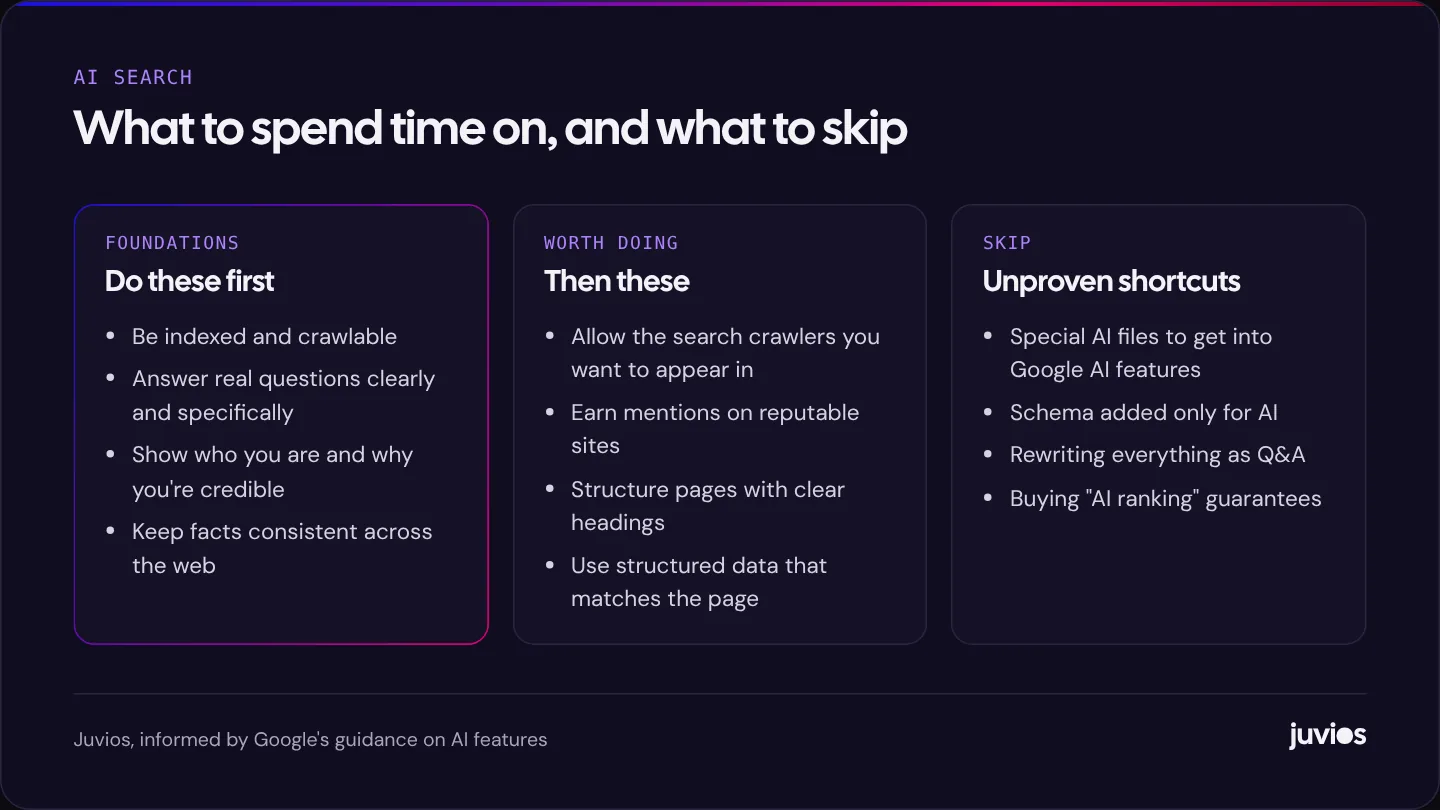
None of the content work matters if the page can't be retrieved. Before anything else, make sure the basics are right.
- Important pages are indexed in Google and Bing. Use Search Console and Bing Webmaster Tools to check. If they aren't, start with why Google isn't indexing your pages.
- Content is in the HTML, not loaded only by scripts after the page appears. Many crawlers don't run JavaScript the way Googlebot does.
- Pages load reasonably quickly and don't hide content behind interactions that a crawler won't perform.
- Structured data, where you use it, matches what's visible on the page. It helps search engines understand the page; Google says it isn't required for AI features.
 Tap to enlarge
Keep what AI says about you accurate
AI tools sometimes get businesses wrong: old prices, a service you no longer offer, opening hours from a directory you forgot about. You can't edit their answers directly, but you can reduce the chance of errors by keeping the sources they draw on correct.
Update your own website first, because it's the source you fully control. Then fix the most visible third-party listings, starting with your Google Business Profile and the directories that rank for your business name. If an AI tool offers a feedback option on an answer, use it to report factual errors. Over time, consistent and current information across these sources is the best defence against being misdescribed.
Advice you can safely ignore
The newness of AI search has produced a wave of products and tactics. Some are harmless, some are a waste of money, and a few are risky.
Special AI files
Proposals such as an llms.txt file, which lists a site's key content for language models, have attracted attention. Google's documentation says you don't need new machine-readable or AI text files to appear in its AI features. Some other tools may read such files, and adding one is harmless, but don't expect it to change your visibility on its own.
Schema just for AI
Structured data is useful when it describes what's on the page. Adding markup purely in the hope that AI tools will pick it up, especially markup that doesn't reflect visible content, is pointless at best. Google says there's no special schema needed for AI features.
Guaranteed AI rankings
Nobody can guarantee that an AI tool will cite your business. The systems are proprietary, they change frequently, and their answers vary with the wording of the question and even between repeated questions. Treat any promise of guaranteed AI placement the same way you'd treat a guarantee of the number one spot on Google.
How to tell if it's working
Measurement is still immature. Google includes AI Overviews and AI Mode traffic in Search Console's Performance report as part of overall web search data, so you can't yet isolate it cleanly there. In analytics, visits from ChatGPT, Perplexity and Copilot often arrive with identifiable referrers, which you can group into a channel of their own.
Beyond the numbers, try the tools yourself. Every month, ask a handful of the questions your customers ask, in the AI tools they're likely to use, and note whether your business appears and what's said about it. It's crude, but it shows you how your business is being described and where the information comes from.
AI search is one part of a wider picture. For how it fits alongside SEO, ads and the rest, see what actually works in digital marketing, and for the search foundations it rests on, SEO basics for small businesses. If you'd like to talk through your own visibility, book a free consultation.
Common questions
01Is AI search optimisation different from SEO?
Much less than it's often presented. For Google, appearing in AI features depends on being indexed and eligible for a snippet, with no extra requirements. Other tools also rely heavily on search indexes. Good SEO is the foundation.
02Should I block AI crawlers?
Decide separately for search and training. Blocking search crawlers such as OAI-SearchBot keeps you out of those tools' answers. Blocking training crawlers such as GPTBot, or using the Google-Extended control, doesn't affect Google Search.
03Do I need an llms.txt file?
Google says you don't need special AI files for its AI features. Adding one is harmless, but there's no evidence it improves visibility on its own.
Sources
- AI features and your website Google Search Central
- Google's common crawlers (including Google-Extended) Google Search Central
- Overview of OpenAI crawlers OpenAI
- Perplexity crawlers Perplexity
- Robots meta tag, data-nosnippet and X-Robots-Tag specifications Google Search Central
- Creating helpful, reliable, people-first content Google Search Central